Outposts (on-premise)
Making files usable that must not leave your building — what an Outpost is, what you manage here, and what happens on the machine.
An Outpost is an application with a graphical interface that you install on a machine in your network — for Windows, macOS (Apple Silicon) and Linux. You point it at folders, and it reads the documents and builds a search index; both stay on that machine, and your files are not copied to the cloud.
Services are a separate preview. Databases in your own network, local MCP servers, and internal HTTP APIs can only be connected in workspaces for which we have explicitly enabled the controlled services preview. If the Outpost only shows folders, that is the expected general early-access scope. Once the preview is enabled, setup is at Services.
You only need an Outpost when files or systems must not leave the building. Every other data source is connected directly under Settings → Data sources, with no hardware of your own.
Early Access — free to try
The Outpost is in Early Access. It is usable day to day and we ship quickly — expect frequent updates, and expect individual screens to keep changing. Trying it costs nothing: 100 documents are free — a preview, not a plan. One service is included only when the separate services preview is enabled for your workspace. Details under Free preview.
It is a complete rebuild of the former DataVault. The old path ran on Docker: effortful to set up, recurringly troublesome in operation — updates nobody applied, containers that did not come back up after a restart — and dependent on operations knowledge that a mid-sized IT team does not have going spare. Those teams were exactly who it was for. So instead of patching it further, we rebuilt it: as an application that installs, pairs and updates itself. We no longer publish Docker images of the Outpost — if you still run such an installation, it moves over, and your data is re-indexed in the process. Get in touch at enterprise@meingpt.com and we will set up the new Outpost together with you. Moving to the new Outpost describes what happens and why.
On-premise does not mean nothing leaves
Every answer takes at least the matching passage out of your network — otherwise there would be no answer. Exactly what leaves is set per folder via the release level. There are two: even the lower one releases the matching passages with their adjacent text and the file name, and the higher one additionally releases the original file.
System requirements
An Outpost runs on Windows, macOS (Apple Silicon only) or Linux — at least 8 GB RAM, 2 cores, and disk space for extracted text and search indexes — the best way to size it is a sample of your documents. The full requirements per platform, firewall allowances and installation privileges are under What you need.
What you manage where
The most common confusion on first contact: there are two surfaces, split by the question of who makes the decision.
| In MeinGPT (Settings → Outposts) | In the program on the Outpost machine |
|---|---|
| which Outposts are reported and connected | which folders and drives are connected; services too when the preview is enabled |
| which reported shares are adopted as data sources | what a folder releases and how source access is protected |
| who may use which documents and internal applications | processing, search indexes, activity and errors |
| cutting off a machine, removing data sources | checking the connection, exporting diagnostics and local settings |
In short: here you decide who may see what and what may leave the building. On the machine you decide what gets read at all.
The two release levels
Every released folder transmits either text only (default: the matching passages with their adjacent text, and the file name) or the original file as well. That is set per folder on the Outpost, not in MeinGPT. The full explanation — including the retired third level — is under The release level.
File system permissions do not carry over
Releasing a folder releases it to everyone who may see that document collection in MeinGPT — including people who could not open it in Explorer or on the share. NTFS, Active Directory and POSIX permissions are not inherited. Mapping folders to teams is therefore its own decision, and one you have to make deliberately.
Exception: for local NTFS folders, there is a beta feature, Windows user permissions (Beta), that honors each user's real NTFS permissions — see Who sees what for details.
When the machine is off, MeinGPT keeps working. Only this Outpost's documents are unfindable for that time — people get answers without those sources, not no answers. An Outpost should still run continuously, otherwise your documents are missing at night and on weekends.
A machine always calls outward. No port is opened in your firewall; the Outpost establishes the connection itself. What it needs is outbound HTTPS to *.meingpt.com.
Cutting off a machine works immediately and without its cooperation: in the Outpost card's menu, choose Delete Outpost. If data sources are still attached, the dialog offers Cut off only — the machine loses its pairing, and the Outpost stays in the list with its data sources. That is the control for "the laptop is gone" or "that employee left". The processed data stays on the machine; it becomes reachable again only after you approve a device anew. If nothing should leave for a while, Pause release is enough.
Free preview
You can try the Outpost for free: 100 documents are included. One service is included only when the separate services preview is enabled for your workspace.
This preview is deliberately small. It is meant to answer one question, and answer it completely: does this run here? Install it on your machine, release a folder, let it index, search in MeinGPT, see the hit from your own document in a chat — 100 documents are enough for that, because whether the chain works is shown just as well by the first indexed document as by the ten-thousandth.
Once those 100 documents are indexed, the preview has done its job — you have the answer it exists to give. From there the question is no longer the technology but the scale: how many collections, how many services, how much storage. We settle that together — write to enterprise@meingpt.com or talk to your contact.
Allowances in production
After that, each workspace has a document allowance — the same count as the free preview, just raised individually to a larger number; there is no separate allowance in gigabytes. The allowance that applies to you, and how many documents are already used, is shown on the Outposts page in MeinGPT. The same holds for the number of internal applications (ERP, internal API, ticket system, …) you may connect.
Both limits are enforced, with no grace band. For internal applications, it is enforced when you create one. For the document allowance, semantic search is blocked as soon as one more document would cross the line — name and metadata search stay open, so you can still find and reduce collections while over the allowance. If usage cannot be determined because an Outpost is unreachable, nothing is blocked.
There is also a per-workspace cap on the number of Outpost machines themselves — independent of the document allowance and internal applications. It is not shown anywhere in advance: if you register another Outpost with no room left, the error at create or approve time names the allowed count. Write to enterprise@meingpt.com to raise it, or remove an existing Outpost first.
Data sources in MeinGPT Cloud have their own separate allowance — in gigabytes rather than documents there, with a 110% grace band above the allowance before it blocks. Both are guardrails rather than packages: most workspaces hold a fraction of them.
If MeinGPT refuses to create another Outpost, that is not a bug but this allowance — the error names the count that applies. If an Outpost cannot be deleted, at least one knowledge collection still points at it; the dialog lists what has to be removed or re-pointed first.
Setup
No Connect button visible?
Outposts is not enabled for every workspace yet. If the button is missing, Settings → Outposts shows a notice with a button to request access instead — or write directly to enterprise@meingpt.com.
You install the Outpost application on a machine at your site — an installer on Windows, a disk image for Apple Silicon on macOS, an AppImage on Linux — and pair it with a connection code.
Set up an Outpost
Requirements, installation, connecting — step by step.
Moving off the Docker setup
From the previous-generation Outpost to the desktop application.
How an Outpost works
What actually happens during indexing and during a search.
Data sources
Which sources need an Outpost, which connect directly in MeinGPT.
Services: database, MCP, HTTP
Step-by-step setup — from the Outpost to the connector in an assistant.
Console & operations
Status, shares, activity, and what support needs from you.
Status in MeinGPT
What the label on the Outpost card means and what to do about each.
Who sees what
Sharing, release level and Windows permissions (beta).
Security
Authentication, encryption, attack surface.
Data administration
Deletion, retention, data subject rights.
Remote terminal (beta)
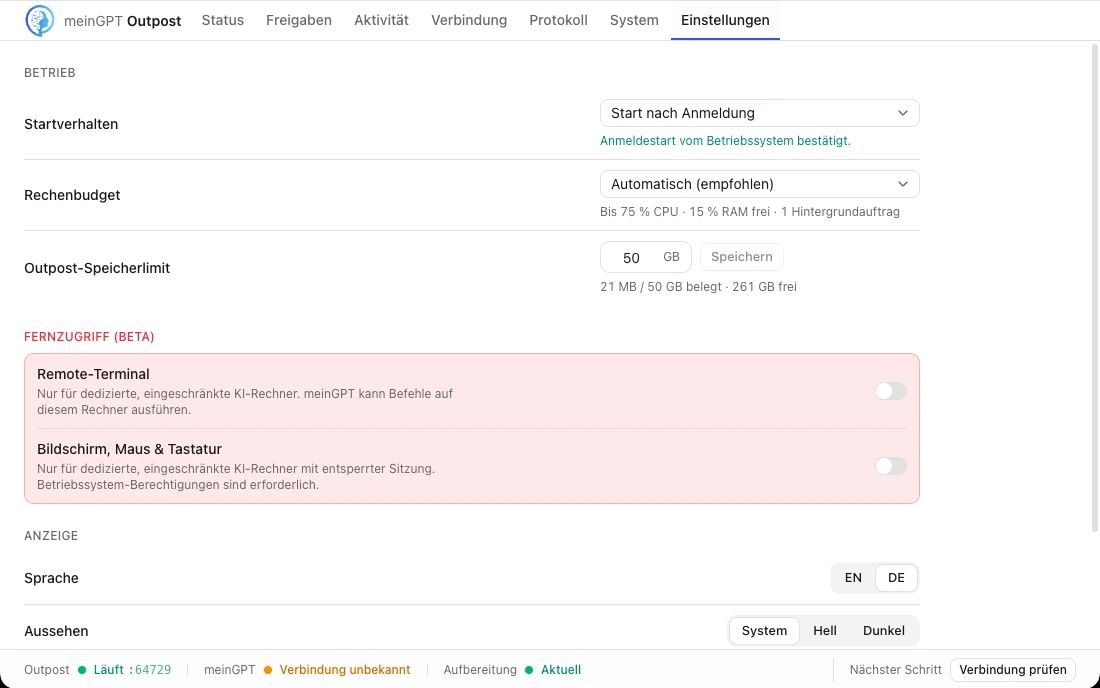
The remote terminal lets a MeinGPT agent run PowerShell or system-shell commands directly on an Outpost computer. It is off by default and needs two approvals: the workspace beta entitlement and the local switch under Settings → Remote access. Platform entitlement cannot activate the local switch.
Enable remote terminal only on a dedicated, restricted AI computer. The grant is broad command access to the host; executions are recorded with actor, Outpost and outcome in the audit log.
Screen, mouse, and keyboard control (beta)
Computer control can view an interactive Outpost session and perform mouse or keyboard actions. An agent may either work one step at a time with a fresh screenshot or run a fixed action sequence after inspecting the screen. It has its own workspace entitlement and its own local switch under Settings → Remote access; both are off by default.
Use it only on a dedicated, restricted AI computer with an unlocked session. macOS requires Accessibility and Screen Recording permissions, Windows requires an interactive session, and Linux requires an X11/XWayland display. A Windows service without a signed-in session reports the feature as unavailable.