Tool Access Policy
How tool availability and method permissions are inherited and enforced at runtime in MeinGPT.
Whether an AI may execute a tool method comes down to four layers working together — from organization-wide settings to runtime enforcement in chat:
- Organization-wide admin settings
- Tool-specific admin overrides
- Assistant-specific method selection
- Runtime enforcement in chat
Core Functions
- global tool availability across BUILTIN, external, and custom MCP tools
- method policies (for example read-only vs. extended write access)
- enablement for connectors, databases, external MCPs, and custom MCP servers
- standardized assistant rollouts via Assistant Creator
This page covers only which methods a tool may execute. For which resources (e.g. which folder, mailbox, or calendar) those methods can reach, see Scope Configuration for Tools.
Important Security Note
MeinGPT currently does not support interactive AI permission prompts at runtime (no built-in "Should I execute this now?" step).
This means:
- If a method is enabled, the AI can execute it within prompt constraints without an extra user approval dialog.
- There is currently no built-in per-action permission popup.
Recommendation:
- Use
Read only (READ_ONLY)as the default. - Enable
write/dangerousonly when the risk is explicitly understood and accepted. - Grant critical methods only in a targeted, per-tool manner.
Overview
Final permission for a tool method call is computed as an intersection:
- Is the tool available at organization level?
- Is the method allowed by global policy?
- Is the method allowed by tool-specific admin overrides?
- If the chat runs through an assistant: is the method explicitly enabled there?
A method is only executable if all applicable checks pass — check 4 only applies when an assistant is involved. For a connector used directly in a chat with no assistant, checks 1–3 alone decide.
UI Location and Orientation
All relevant controls are in:
Settings > Knowledge & integrations > Plugins- Route:
/:organizationId/settings/tool-management
Notes:
- Method categories (
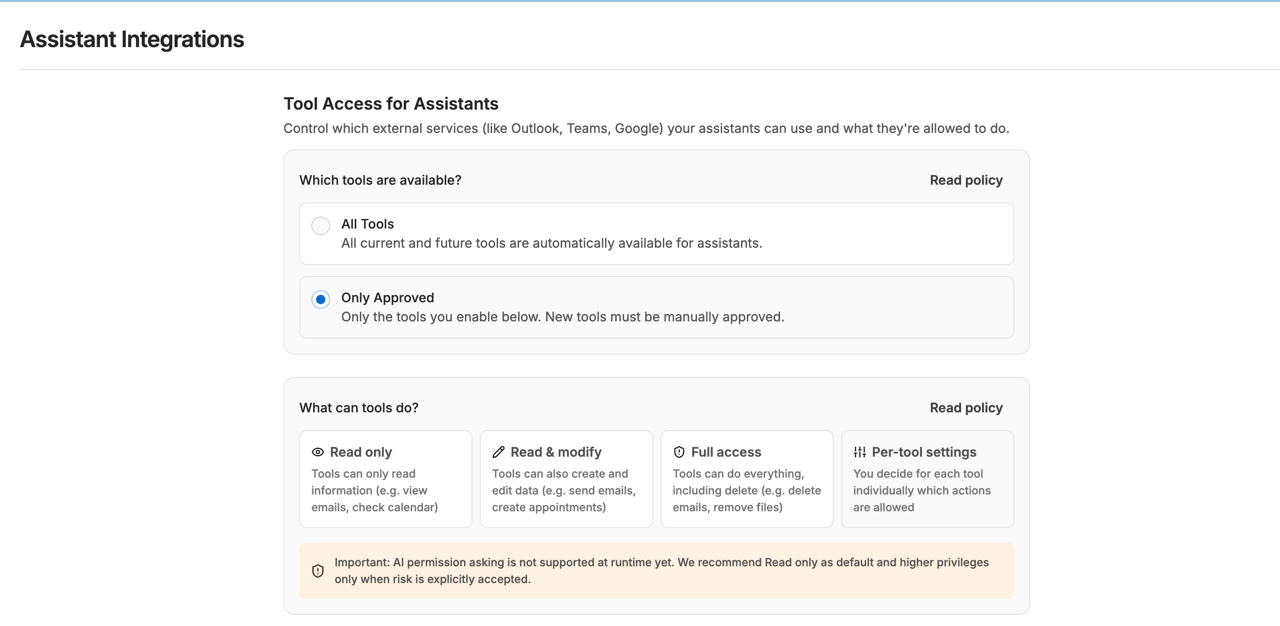
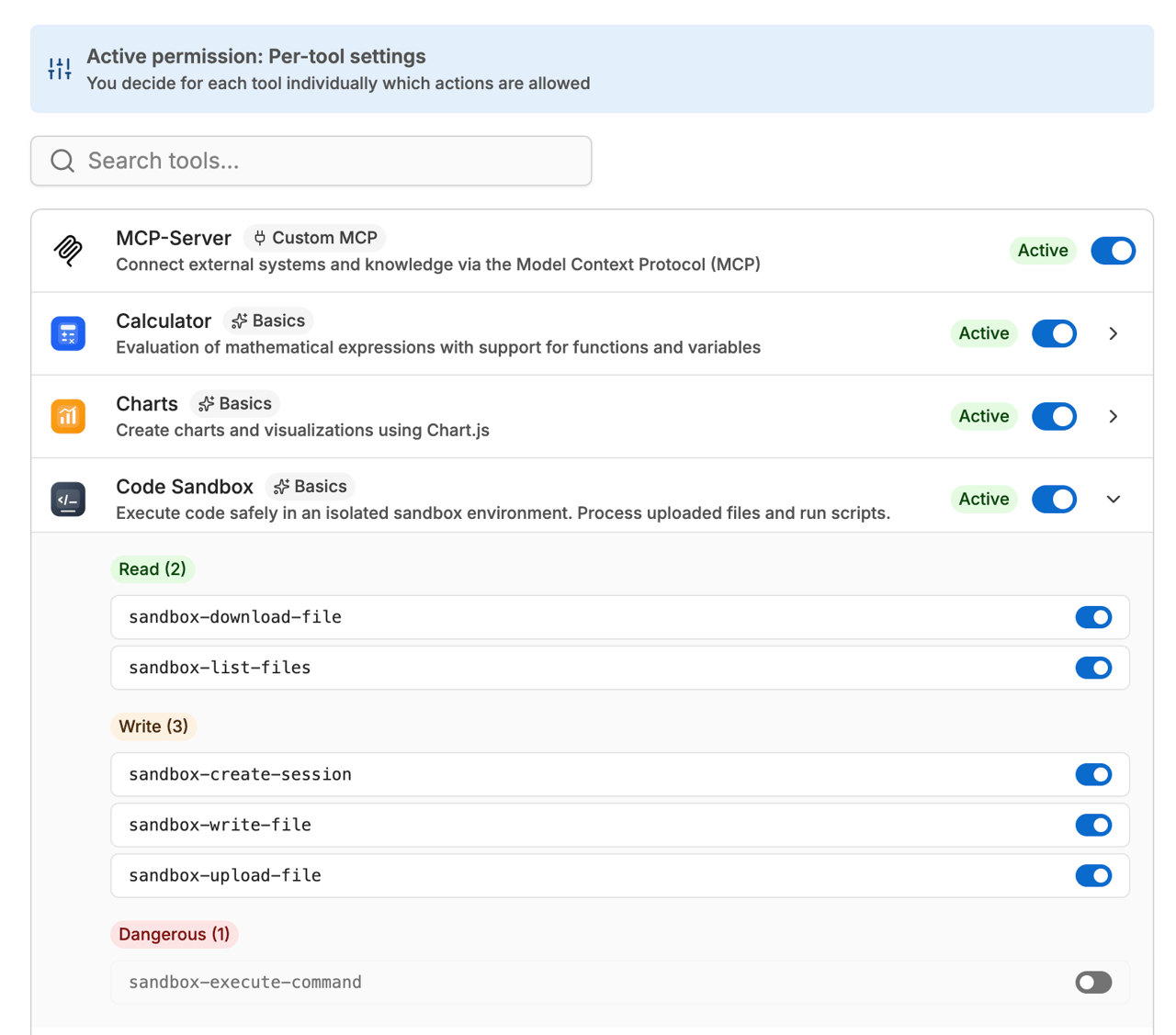
read,write,dangerous) are shown in grouped sections in each tool detail. - The first screenshot shows the top control area:
Who installs(Admins only/Members themselves/All available) and global Method Policy (READ_ONLYtoCUSTOM). - The second screenshot shows the expanded per-method table of a tool; it is only available when policy is set to
CUSTOM.
Layer 1: Tool Availability (Organization)
In Settings > Knowledge & integrations > Plugins, admins decide which tools are generally available.
All availableAll current and future tools are available.Admins onlyOnly explicitly approved tools are available.Members themselvesLikeAdmins only, but members can install allowed plugins themselves, for example when adding one to an assistant. This mode only appears once it is enabled for your organization.
Notes:
- Applies to BUILTIN, EXTERNAL_MCP, and CUSTOM_MCP tools.
- If a tool is unavailable here, it is removed server-side before chat runtime.
- For user-added custom MCP servers (see Custom MCP Server): a user can still create and save their own MCP server connection under Settings → Connectors – it shows as active there. However, once the
custom-mcpcapability is disabled here, that server is removed server-side from every chat/assistant and cannot be executed by any user in the organization, regardless of who added it. - The Custom MCP switch only appears when
Who installsis notAll available. WithAll available, custom MCP servers are automatically usable for everyone and cannot be disabled separately.
Behavior for newly shipped tools under Admins only:
- New core tools from the
Basicscategory (e.g. calculator, charts, documents) are available automatically as soon as MeinGPT ships them. - If you disable such a tool, it stays disabled — including future updates.
- New connectors and databases are NOT enabled automatically; they always require explicit approval.
Members install plugins themselves
With Members themselves, every plugin has one of three states:
- Installed: usable in chats and assistants.
- Available: not installed yet. A member installs it for the whole workspace when they add the plugin to an assistant or chat.
- Blocked: members do not see it and cannot install it. Only admins can unblock it.
The first time this mode is turned on, MeinGPT keeps what your organization actually uses: plugins configured in assistants or chats, plugins with a connected account, plugins called in the last 90 days, Outpost services, and custom MCP servers. Basic tools from Basics stay installed. What you blocked stays blocked; everything else becomes Available.
If you switch back to Admins only, every installed plugin stays installed.
Plugins for knowledge sources
Every knowledge source except an upload belongs to a plugin: SharePoint, OneDrive, Google Drive and Confluence to their connectors, the web crawler to web search, and S3, WebDAV and local folders to their own plugins under Indexing only.
You allow each use of a plugin separately:
- In chat:
Installed,AvailableorNot installed, orBlocked, as described above. - As a knowledge source:
AllowedorBlocked. Blocked means no new sources of this type can be created. Existing sources keep running until you delete them and show "Blocked as a knowledge source" on the Data sources page.
The two are independent. Blocking Google Drive in chat still lets you create Drive sources; creating a Drive source installs nothing in chat. This lets you provide selected folders as knowledge without everyone connecting their own Drive in chat.
A source reads with the account it was last connected with; if that account is disabled at the provider, the source stops syncing. The plugin page names who created the sources.
Use and details
The page shows every plugin as a card, with one search and categories across all of them. In use comes first: plugins used in assistants, with connected accounts or as a knowledge source, with those numbers on the card, plus plugins an admin installed. Below are More plugins (with Install wherever there is an installation), and folded Basics and Blocked. Without installations (All available) nothing is "installed", only "allowed". Who installs, the default permission and custom MCP servers are under Settings.
Every plugin has its own page: examples, description, functions by read, change and delete, knowledge source and connection, and next to them the permissions in chat and as a knowledge source, the assistants by name, access, history and the guide.
What the plugin page shows about data protection, costs, plugins on request, retirements and apps is described under Managing plugins.
Connection shows how people sign in and who already connected. There is no shared account for the whole workspace yet: everyone connects their own account, usually when adding the plugin to an assistant. Before installing, MeinGPT sums up who can use the plugin, what it may do and how people sign in. If you block or uninstall a plugin that is in use, MeinGPT asks first and names what is affected.
Enable Outpost services
If the services preview is enabled for your Outpost, Admins only also applies to databases and MCP services registered there. A new service appears in an assistant's connector catalog only after an admin enables it on the Plugins settings page. The service must also be shared with the relevant people or teams on the Outpost card.
While a registered service is awaiting enablement, MeinGPT shows admins a notice on the Outposts page and in the assistant editor, with a link to that service's exact row on the Plugins page. Members who have access to the service see a general notice in the assistant editor and can ask an admin to enable it. With All available, this extra enablement is unnecessary.
Layer 2: Global Method Policy (Organization)
Unless Who installs is All available, admins can also set a global method policy:
Read only (READ_ONLY):readonlyRead & modify (READ_WRITE):read+writeFull access (FULL):read+write+dangerousPer-tool settings (CUSTOM): granular per-method control
Important:
- This policy is an upper bound.
- Disallowed modes are marked unavailable at admin layer.
- Categories come from each tool definition (backend) and are exposed in UI as
read/write/dangerous.
Important for the combination with tool availability:
CUSTOMis only effective whenWho installsis notAll available.- With
All available, the allowlist is inactive and new tools are automatically available. - If you switch back to
Admins onlyorMembers themselves, the stored method policy applies again as upper bound.
Layer 3: Per-tool Method Overrides (CUSTOM only)
With CUSTOM, admins can enable/disable specific methods per tool.
Rules:
read/writeare allowed by default unless explicitly disabled.dangerousis blocked by default unless explicitly enabled.
This allows targeted control over send/delete/high-impact methods.
Caveat: a method restriction only blocks that exact method call - it does not check whether a different, still-enabled method of the same tool can produce an overlapping effect through its own inputs. Example: Google/Outlook Calendar expose calendar_create_event (write, enabled by default) and calendar_invite_attendees (dangerous, blocked by default). Blocking calendar_invite_attendees stops that specific action, but calendar_create_event independently accepts an attendees field and sends the same invitation notifications when creating an event - this is not gated by the calendar_invite_attendees setting. When restricting a method, check what that method's inputs allow, not just its name.
Layer 4: Assistant-level Method Selection
In the assistant editor, users can select methods per tool.
This selection is stored as enabledMethodIds and acts as an additional restriction:
- If
enabledMethodIdsexists, only listed methods are enabled. - Unselected methods stay disabled even if globally allowed.
This layer only exists for assistants today. A connector enabled directly in a chat with no assistant has no equivalent method-level restriction — only Layers 1–3 apply there.
Runtime Enforcement in Chat
When chat starts, the backend computes:
- Filter tools by organization availability policy.
- For each BUILTIN tool, derive effective methods from:
- assistant selection (
enabledMethodIds) — only relevant if the chat runs through an assistant - global policy
- CUSTOM overrides
- assistant selection (
- Register only the resulting method set in Toolkit.
Result:
- Methods outside that final set cannot be called by the model.
Precedence (highest first)
- Tool unavailable (organization policy) -> full tool blocked
- Method blocked by admin policy/override -> method blocked
- Method not in
enabledMethodIds(only relevant with an assistant) -> method blocked - Remaining methods are executable
Common Misunderstandings
"I disabled a method but it still executed."
Check:
- Was the assistant saved after changes?
- Is the method actually absent in
enabledMethodIds? - Is chat using the same assistant version?
- Is similar behavior available via another enabled method - either of a different tool, or of the same tool (e.g. an event-creation method that itself accepts an attendees/recipients field)?
"Why is a method not selectable in assistant config?"
It is likely admin-locked (isEnabledByAdmin = false).
Scope of Method Policies
- Method-level policies apply to BUILTIN tools with defined methods.
- EXTERNAL_MCP/CUSTOM_MCP are governed at tool availability level.
Practical impact:
-
BUILTIN: methods can be controlled granularly.
-
EXTERNAL_MCP: currently tool-level enable/disable only, no method-level admin overrides.
-
Custom MCP servers (CUSTOM_MCP): under Settings → Custom MCP servers you decide three things.
- On or off (
custom-mcp): while off, nobody can connect a custom MCP server and connected ones do not run. - What may custom MCP servers do?
Everything the server offers(default),Read and change, not deleteorRead only. The server declares the classification itself (MCP annotationsreadOnlyHint,destructiveHint); functions without a declaration count as “delete”, as the MCP specification defines. The rule guards against unintended changes by the AI, not against a server that declares falsely. Many servers do not annotate their functions yet; withRead onlythey do not run at all. - Allowed addresses: one per line, e.g.
wiki.company.comor*.company.comfor every subdomain. Empty means every public address. Servers elsewhere cannot be connected and stop running.
When connecting, MeinGPT checks the server first and shows its functions by read, change and delete, including which of them do not run in your workspace. The Plugins overview shows each server under Connected by members; in the settings you can block a single server. A blocked server runs in no chat, no assistant and not through the CLI either.
- On or off (
-
MCP servers for the workspace: Add MCP server on the Plugins page adds a server for everyone: icon, name, description, address (public, https) and sign-in: each person with their own account (OAuth), each person with their own API key (header), or none. With header you only name the headers, for example Authorization or X-Auth-Token (Authorization and names starting with X- are allowed, except those MeinGPT sets itself, such as X-API-Key); everyone enters the value themselves when connecting, encrypted and only for them. Who may add servers for the workspace is governed by the permission Provide plugins for the workspace (default: admins only). MeinGPT checks the server first and shows its functions; you accept the risk explicitly. It is then installed and appears in the store with origin “Workspace”; members connect it like any plugin. Who it applies to is set on its plugin page, where you can also rename or remove it. Address and sign-in are fixed afterwards; removing it also deletes every member's connection. The rules for custom MCP servers (allowed addresses, what they may do) do not apply to workspace servers: you decide about those when adding them.
Concrete Example (End-to-End)
Example target:
- Allow a CRM tool, but only contact read operations.
- Keep update/delete methods blocked.
Flow:
- In
Settings > Knowledge & integrations > Plugins, setWho installstoAdmins only. - Set Method Policy to
CUSTOM. - Enable the CRM tool (e.g., Salesforce/HubSpot).
- Keep
read_contactsenabled. - Disable methods like
update_contactanddelete_contact. - Save assistant and additionally restrict to required methods in
enabledMethodIds.
Result:
- The assistant can read contacts.
- Write/delete methods are not registered in Toolkit and cannot execute at runtime.
- If the same connector is used directly in a chat with no assistant instead, the same steps 1–5 (organization policy + CUSTOM overrides) still apply; step 6 (the extra
enabledMethodIdsrestriction) doesn't apply, since there's no assistant-level equivalent.
Recommended Admin Rollout
- Start with
Admins only. - Set method policy to
CUSTOM. - Enable only required tools.
- Allow
dangerousonly explicitly per method. - Let assistant owners further narrow methods per assistant.