Set up an Outpost
From an empty machine to the first searchable folder — with the Outpost application for Windows, macOS and Linux.
An Outpost is a machine at your site that makes your documents searchable. You install the Outpost application on it — a program with a user interface, for Windows, macOS and Linux — and point it at folders. The program reads the documents and builds a search index; both stay on that machine.
This installs an Outpost, not Cloud Vault — and only as much leaves as you release
This page keeps its former URL so existing bookmarks continue to work. The product installed here is the self-hosted Outpost. Cloud Vault is a separate MeinGPT service and is not installed on this machine — see Data sources (RAG) for what it is. See the canonical Outpost overview for the product boundary and supported environments.
"On-premise" does not mean nothing leaves your network — it means only what you release leaves it. Source files and the search index are not centrally synchronised, but every answer carries at least the matching passage out, or there would be no answer. Exactly how much is decided exclusively per folder on the Outpost by the release level below.
The Outpost itself is still under active development:
Early access — free to try
The Outpost is in early access. It is usable day to day and we ship quickly — expect frequent updates and expect individual screens to change.
You can walk the whole setup below for free: 100 documents are included. That is a preview, not a plan — it is sized so you can see once that the setup works: pair, release a folder, let it index, search. For production use, talk to us (enterprise@meingpt.com).
What you need
The machine reads your documents and answers search queries. It should stay on: while it is off — or while the Outpost is stopped — its documents cannot be found. MeinGPT keeps working; only these sources are missing.
Operating system
| Platform | Requirement |
|---|---|
| Windows | Windows 10 version 1809 or later, Windows 11, Windows Server 2016 (until 12 January 2027), Windows Server 2019 or newer, 64-bit |
| macOS | Apple Silicon (M1 and newer) — no build for Intel Macs |
| Linux | x86-64 with glibc 2.39+ and libstdc++ providing GLIBCXX_3.4.31, verified on Ubuntu 24.04 LTS and Debian 13 |
Physical or a VM.
Linux: older distributions are not supported
Debian 12, Ubuntu 22.04 LTS, Rocky Linux 9 and AlmaLinux 9 are below the
minimum (glibc 2.39). On them, text extraction from documents fails with the
error ERR_DLOPEN_FAILED. Check the glibc version with ldd --version
before installing.
Windows Server 2016: supported until 12 January 2027
Microsoft ends support for Windows Server 2016 on that date, and the Outpost supports it until then. Plan the move to Windows Server 2019 or newer. After that date, an Outpost on Windows Server 2016 keeps running its installed version and receives no updates.
Windows: the Visual C++ Redistributable (x64) has to be there first
The installer aborts when the Microsoft Visual C++ Redistributable (x64) is missing or outdated and offers you the download of the current version: aka.ms/vc14/vc_redist.x64.exe. On a freshly installed machine it is regularly absent. An unattended install aborts without a dialog and states the reason in the installation log.
Machine and access
| Memory | At least 8 GB RAM and 2 cores. We recommend 16 GB for production and 32 GB for large or OCR-heavy collections. No GPU required. |
| Disk | Allow space for extracted text, search indexes, and temporary space during index upgrades. Size the storage budget using a representative sample of the collection. |
| Access to your storage | Local path, UNC path or mount readable by the runtime identity. On Windows, the unattended service accesses domain shares as the computer account DOMAIN\HOSTNAME$. |
| Optional services preview | Only when enabled for your workspace: databases and local MCP servers must be reachable from this machine. |
Installation privileges
| Platform | What's needed |
|---|---|
| Windows | Local administrator rights for installation, repair, service control and configuration changes. The service status view opens without a UAC prompt. |
| macOS | Drag the application out of the disk image into your Applications folder — depending on the account, macOS asks for administrator rights while you do. |
| Linux | The AppImage starts without elevated rights. |
No reboot needed.
Linux: The Outpost stores its device key encrypted in the operating system's keyring (Secret Service, e.g. GNOME Keyring or KWallet). A keyring must be running in the session the Outpost starts in; the Outpost does not accept unencrypted storage, and pairing fails otherwise. On Linux the Outpost runs as a normal application in your user account; there is no system service as on Windows. When you enable "Starts after I sign in" in Settings, the application writes the XDG autostart entry ~/.config/autostart/com.meingpt.outpost.desktop and starts without a window on sign-in.
There is no database, no container and no runtime to install alongside it. Server, search index and the built-in embedding model are inside the application.
There is no Outpost for Intel Macs
The macOS build runs on Apple Silicon only (M1 and newer). There is no download for a Mac with an Intel processor, and Rosetta does not help here — it translates in the other direction.
Check this before you download: Apple menu → About This Mac. If it lists Chip and an "Apple M…", you are fine. If it lists Processor and an Intel model, use a Windows or Linux machine for this Outpost — the application is the same on all three.
What the firewall has to allow
Two outbound connections, both on port 443. No inbound port, no port forwarding.
| Host | Port | Type | Purpose |
|---|---|---|---|
bridge.meingpt.com | 443 | HTTPS/WSS | The tunnel MeinGPT sends search queries through |
app.meingpt.com | 443 | HTTPS | MeinGPT API and pairing |
This list is also in the application
The Outpost prints it on the Connection tab under Network requirements — with a Copy button. That is the most reliable way to hand it to IT: it states what this machine in this version actually needs, including a different MeinGPT URL if you run your own instance.
Step 1 — Install the program
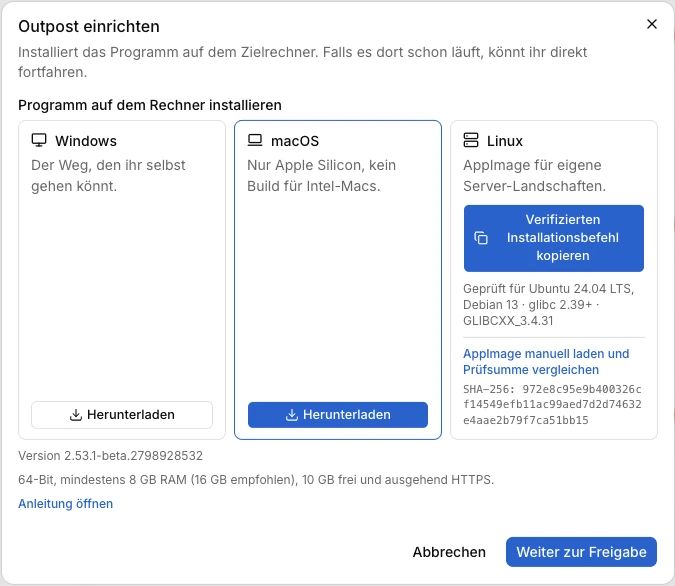
Download the application on the prepared machine, not on your own workstation. You find the download in MeinGPT under Settings → Outposts → Connect Outpost:
| System | What you get | What you do with it |
|---|---|---|
| Windows | an installer | run it, follow the wizard |
| macOS | a disk image (.dmg) for Apple Silicon | open it, drag the application into Applications |
| Linux | a verified install command | copy it from MeinGPT and run it in a terminal |
How you can tell you installed the right thing
The Windows installer is signed with a publicly trusted certificate for SelectCode GmbH; Windows shows the publisher before installing. The macOS application is signed with a Developer ID certificate and notarized by Apple — so it opens on a plain double-click. There is no Gatekeeper block to work around and no right-click detour. On Linux, MeinGPT first checks the downloaded bootstrap script against the SHA-256 from its authenticated release response. That script verifies an Ed25519-signed installation descriptor and then the AppImage size and SHA-256 before installing it. The AppImage itself carries no operating-system code signature. The manual AppImage link is therefore a recovery path only: compare the complete SHA-256 shown beside it before starting the file.
Updates are protected on all three systems: the Outpost verifies every update against an Ed25519-signed manifest plus the checksum of the individual artifact. After that it keeps itself current — there is no manual update step.
Step 2 — Pair
On Windows, first select Change configuration and approve the Windows prompt. The service status view remains accessible without administrator rights.
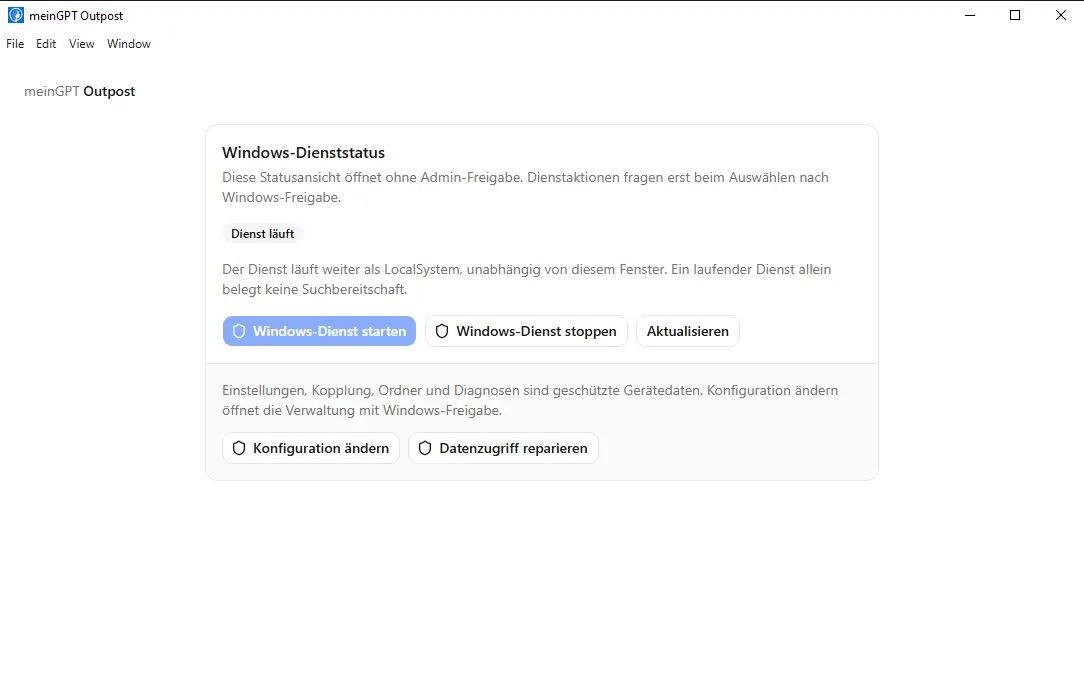
On first start the application walks three screens: Pairing, Resources and Folder. On the first one, the machine generates its own code — not MeinGPT; you approve it afterward in MeinGPT. The full flow with the code, fingerprint phrase, and what to do if pairing does not go through, is under Create and pair an Outpost.
Step 3 — Set resource limits
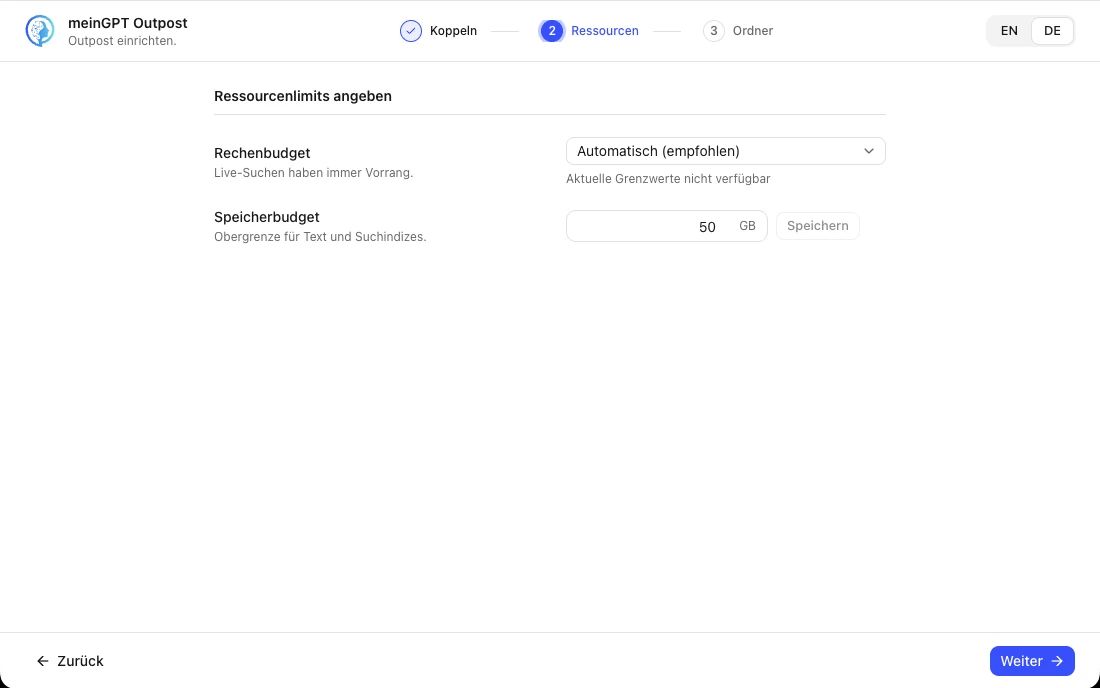
Once pairing succeeds, the wizard advances automatically to Resources. Two settings are required here before you can continue — both can be changed again later, in the application's Settings tab.
Compute budget — a profile: Resource-conscious operation, Automatic (recommended), or Faster background indexing. Live searches take priority over background indexing under every profile; the profile only decides how much CPU, RAM and how many background jobs are reserved for it, and the application shows the current limits right below it (e.g. "Up to 50% CPU · keep 20% memory free · 2 background jobs").
Storage budget — a ceiling for text and search indexes combined. The default is 200 GiB (shown as “200 GB” in the application). Change it under Settings → Outpost storage limit. This value does not reserve disk space: indexing pauses independently of the configured limit when less than 512 MiB or 5% free space remains. For production, measure a representative sample and allow for temporary space during index upgrades, as described under What you need.
At 80% usage, Status and Settings warn with the used storage and limit. Indexing continues; raise the limit before it is reached, provided the disk has enough room.
The update raises stored limits of exactly 50 GiB to 200 GiB, including
an earlier deliberate choice of 50 GiB. Other values stay unchanged.
Folders set to Automatic may consequently start building their vector
index if the storage budget was the missing requirement. This uses
additional processing time and storage.
Step 4 through 6 — Share, adopt, start
What gets read is decided in the program on the machine, not in MeinGPT: the Shares tab → Share → A folder. You then adopt the reported folder in MeinGPT under Settings → Outposts → Manage → Shares and grant access to the right people or teams. Finally you press Start in the status bar — only then does it read, index and answer.
The full flow with every intermediate step, screenshots, and what to watch for with network drives, is under A folder on this machine.
Services are a separate preview
Databases and local MCP servers only appear when we have enabled the controlled services preview for your workspace. Seeing only folders here is the expected state in the general early access.
These three steps in detail
A folder on this machine
Pick the path, set the release level, adopt it in MeinGPT — step by step.
An SMB share
Mount it, then treat it like a local folder.
The console: verify and operate
What the seven areas show, how you verify that it works, and what support needs from you.
How much may leave?
Applies per folder, and the decision is made in the Outpost — not in the web console: Shares → open the folder → "What this folder releases". The choice is between text only (default) and additionally the original files; the full explanation is under The release level.
More topics
Beyond the setup itself:
Your own root certificate
When your network inspects TLS with an internal CA.
Security
Authentication, encryption, attack surface.
Moving off the previous generation
For teams still running the Outpost as a container.
Note
In the default case you do not need an Outpost: data sources can be connected in MeinGPT directly, without running a machine yourself. An Outpost pays off when source files and the search index must stay in your network, or when systems cannot be reached from the cloud. You control per folder on the Outpost what individual requests may transmit.