A folder on this machine
Connect a local folder or a mounted network drive to a MeinGPT data source.
This is the most common case and the reason the Outpost exists: a folder sits on the machine (or is mounted there as a drive), and MeinGPT should be able to search it. The source and search index stay there; you decide per folder on the Outpost what may leave for a request.
Only with your own Outpost
Only an Outpost can read a folder on a machine. Without your own Outpost this source type does not exist — you connect your storage in MeinGPT directly instead (SharePoint, Google Drive, S3 …).
It is two steps, in two places
The connection is made of two halves, and the order is not arbitrary:
| Where | What | |
|---|---|---|
| 1 | In the Outpost | Share the folder — pick the path, data retrieval, and local source access. |
| 2 | In MeinGPT | Adopt the reported folder under Shares, name it, and then grant Access. That is what decides who may find it. |
The machine reports its folders itself; MeinGPT can only adopt what was reported. The data source in MeinGPT does not know where the folder is — that exists only on the Outpost machine. The Outpost does not know who may search — that exists only in MeinGPT.
One setting, one owner
Data retrieval and source access are set exclusively on the Outpost. MeinGPT only displays the values most recently reported by the device and can neither change nor widen them. In the platform you manage adoption, the name, user access, and any narrower tool policy.
Share the folder in the Outpost
Shares tab → Share → A folder.
The path must be absolute — C:\Data\Quotes or /srv/documents. Choose folder opens the operating system's file dialog.
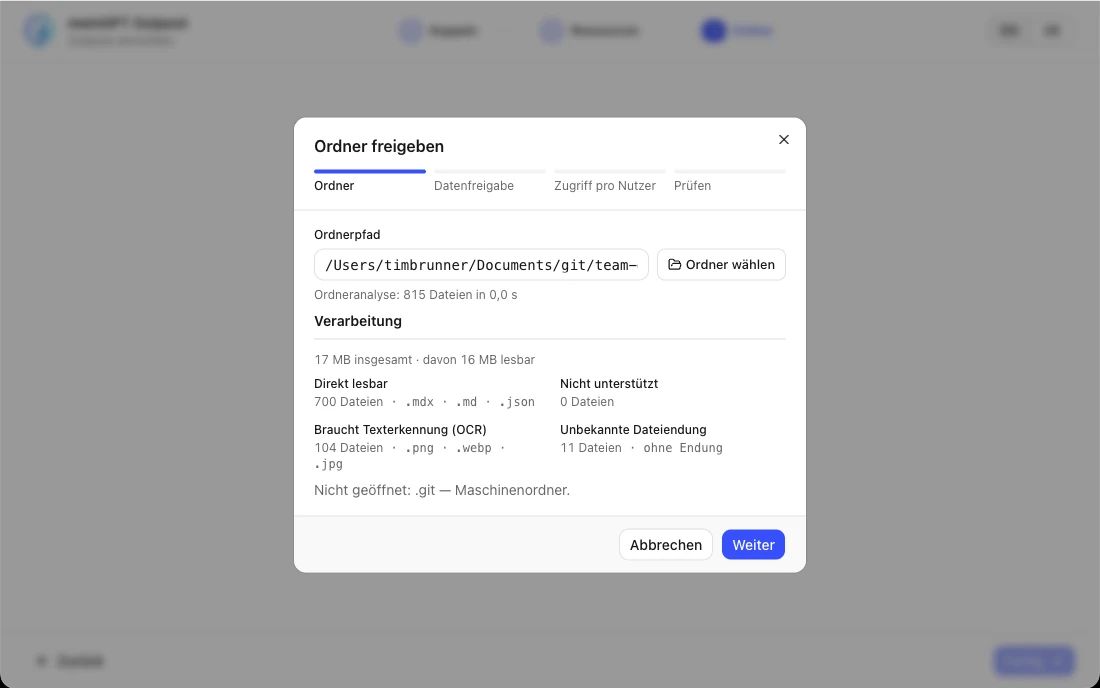
The same wizard immediately continues with two more steps for release level and source access — the next two steps on this page. There is no ID to type: the machine reports the folder to MeinGPT itself once you save.
Decide how much it releases
Open the folder's row. At the very top: What this folder releases:
| Level | What travels to MeinGPT |
|---|---|
| Text only (default) | the matching passages with their adjacent text. The files stay on this machine. |
| Text and original files | the file itself as well — it then leaves the machine. |
The decision is made here, not in MeinGPT: whoever binds the folder is the person who knows whether its files may leave the building. The platform only displays this device report.
Set source access
Read only is the default. Read and write allows MeinGPT to explicitly create, edit, rename, or recoverably delete small text files inside the shared folder. Data retrieval and source access are independent: permission to retrieve original files does not grant write access.
When saving, the Outpost checks the operating-system permission. Before every change it checks the current local policy and target path again. Create and rename never overwrite; edit and delete retain the previous file in the local recovery area. The platform can only narrow this local ceiling.
Adopt it in MeinGPT and share it
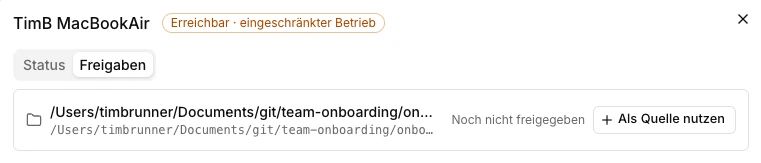
Settings → Outposts → Manage → Shares. The reported folder is listed there with its path. Use as source, give it a name — from then on it is a collection like any other.
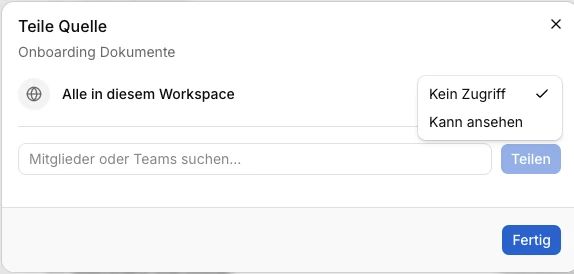
That does not yet make it visible to anyone except workspace admins. In the list of document collections, click Access and add the people or teams that may work with it, or share it with everyone in the workspace — that is what decides who finds the documents. Assistants themselves cannot be added; how this works with assistants is explained in Who sees what.
Let it index
If the Outpost is running, the pass starts on its own. If the status bar at the bottom says Stopped, nothing happens — press Start first. The row under Shares only shows whether the folder is already usable. Open the folder and switch to Processing to follow file discovery, text extraction or OCR, and the keyword and vector indexes separately.
Network drives
A network drive works as a local folder if it is permanently mounted from the Outpost process's point of view:
- Windows: a UNC path only (
\\server\share\folder). A mapped drive letter (e.g.Z:\) is always rejected by the Outpost, regardless of which account it runs as — the Outpost runs as a background service, and mapped drive letters are not visible to it. Details on SMB shares. - Linux: a mount point from
/etc/fstabthat survives a reboot.
The folder must be readable by the account the Outpost runs as. Grant that account operating-system write access only when Read and write is enabled for this exact folder in the Outpost.
What gets read, and what does not
The Outpost reads the folder including subfolders and picks up new, changed and deleted files on later runs.
The Outpost watches shared folders continuously via a live filesystem watcher and also runs a full reconciliation pass every 30 seconds, so new, changed, or deleted files are typically picked up within seconds. Use "Read everything again" under Shares to trigger an immediate full re-scan at any time.
Supported file formats:
| Format | How the text comes out |
|---|---|
.pdf | text and layout extraction, text recognition for scans |
.docx | text including headers and footers, comments, footnotes and endnotes, and link targets; plus text recognition on embedded images |
.pptx | slide text including speaker notes, chart and SmartArt text, and link targets; plus text recognition on embedded images |
.doc, .xls, .xlsx, .odt, .ods, .odp, .eml, .msg | plain text, no text recognition |
.txt, .md, .rst, .html, .htm, .csv | plain text, including older character encodings such as Windows-1252 |
.png, .jpg, .jpeg, .tif, .tiff, .bmp, .webp, .heic | text recognition only |
The Outpost also reads other plain-text formats such as .json, .yaml, .log, .py, .ts or .js, even without their own row in this table.
What it cannot process, it skips — and that is the thing that decides answer quality. Open the folder under Shares. Source documents lists the affected files with the concrete reason; Processing shows exceptions while building the search indexes.
Typical exceptions and what they mean:
.zip,.tar,.7z,.rar— archives are not unpacked, whatever the format. If the quote is inside an archive, nobody finds it..msg— individually exported Outlook mails. There is currently no dedicated mailbox source — only individually exported messages are read.no extension,.exe,.dll,.pyc— no text inside, correctly skipped.- Video (
.mp4,.mov,.avi…) — no text that can be extracted as-is. - Audio files (
.mp3,.wav…) — also no text. - Photos without text — the Outpost reads image files through text recognition, and only the text on them becomes searchable. A photo with no labelling yields no hit. Details: Images in a data pool.
- Its content does not match the file extension — a photo saved as
.htm, for example. The Outpost recognises this from the first bytes of the file and keeps it out of the index instead of reading its binary content as text. A previously indexed version stays searchable. - Text recognition could not read the scan — text recognition does not trust its own result, for example on a page that is upside down. The Outpost then reports the file as failed instead of putting unreadable text into the index. A single unreadable page is enough; a previously indexed version stays searchable.
Limits per file
So that a single file cannot tie up the machine, every file is held to fixed limits:
| Limit | Value | Applies to |
|---|---|---|
| File size | 32 MB (32 MiB, exactly 33,554,432 bytes) | all formats except .txt, .md, .rst |
| File size for plain text | 10 MB (10 MiB) | .txt, .md, .rst |
| Reading time | 60 seconds per attempt, at most 2 attempts | all formats, text recognition included |
| Text recognition in scanned PDFs | 50 pages | PDFs without their own text layer |
| Extracted text | 10 MB (10 MiB) per file | all formats |
What happens when a file goes over:
- Too large: the Outpost does not read a file above the size limit at all. Source documents then shows "This file is larger than the 32 MB size limit." (10 MB for plain text), and MeinGPT shows "larger than the Outpost's file size limit".
- Too slow: if reading takes longer than 60 seconds, the Outpost stops the attempt and reads the file again on the next pass. After at most two attempts on the unchanged file it gives up — attempts that failed for another reason count too: "Reading this file took longer than 60 seconds. Outpost stops after 2 attempts on an unchanged file." How long reading takes depends on the machine — a PDF with several thousand pages can hit the time limit even below 32 MB.
- Other limits — the page count for text recognition, the amount of extracted text, the unpacking limits for Office files — appear as "This file exceeds a local processing safety limit."
The Outpost does not keep retrying a file it gave up on, and the files behind it continue to be read as usual. If an earlier version of the file was already searchable, it stays findable in both cases until a readable version is saved. Once the file changes — split, reduced or replaced — the Outpost reads it again automatically, with two fresh attempts. Page-by-page reading of very large documents is planned.
A folder you release is open to everyone who can see the data source
File and directory permissions do not travel. Anyone allowed to see this data source in MeinGPT finds every document in it — including someone who could not open the folder in Explorer. Check that before you release it, not after.
There is one beta exception: Windows user permissions (Beta) can be enabled per workspace, and it makes each user's real NTFS permissions apply to search, download, and file changes — but only for folders bound as a local NTFS folder on this machine itself. Network drives and shares connected via UNC path are excluded from this feature; the rule above still applies to them. Talk to your account contact if you'd like to test this beta feature. Setup and limits: Who sees what.
The first search in MeinGPT
Once the folder is adopted and the Outpost reports Running, it is a data source like any other — the way to it no longer goes through the Outpost.
Wait for indexing
Under Shares → folder you can see how many files have been read and indexed. With large collections the first pass takes a while; every file is searchable as soon as it is in the index.
Attach it in a chat, or give it to an assistant
For a one-off question, attach the data source directly in a chat. If a team is to work with it permanently, add it as knowledge on an assistant. Adding it as knowledge does not by itself give the assistant's users access — a workspace admin still has to share the data source with them separately under Settings → Data sources.
Test with a term that exists only there
For the first test, pick a term that can only come from this folder — a document number, a project name. If the answer comes back with a citation, the chain from the machine into the chat works.
Who may see the source is decided in MeinGPT under Settings → Data sources; what can be opened behind a citation depends on the folder's release level. Both in detail: Data sources (RAG).
When nothing gets indexed
- Status bar: does it read
Running? If not, press Start. - Shares → folder → Source documents: is this the expected path, and which file reports which error?
- Shares → folder → Folder activity: the failed synchronization names the cause and the next action.
- Processing: if files failed during extraction or while building the keyword or vector index, the exception is shown at the affected stage.