Chats
The chat as the central tool: input area, tools in the "+" menu and Quick Actions at a glance.
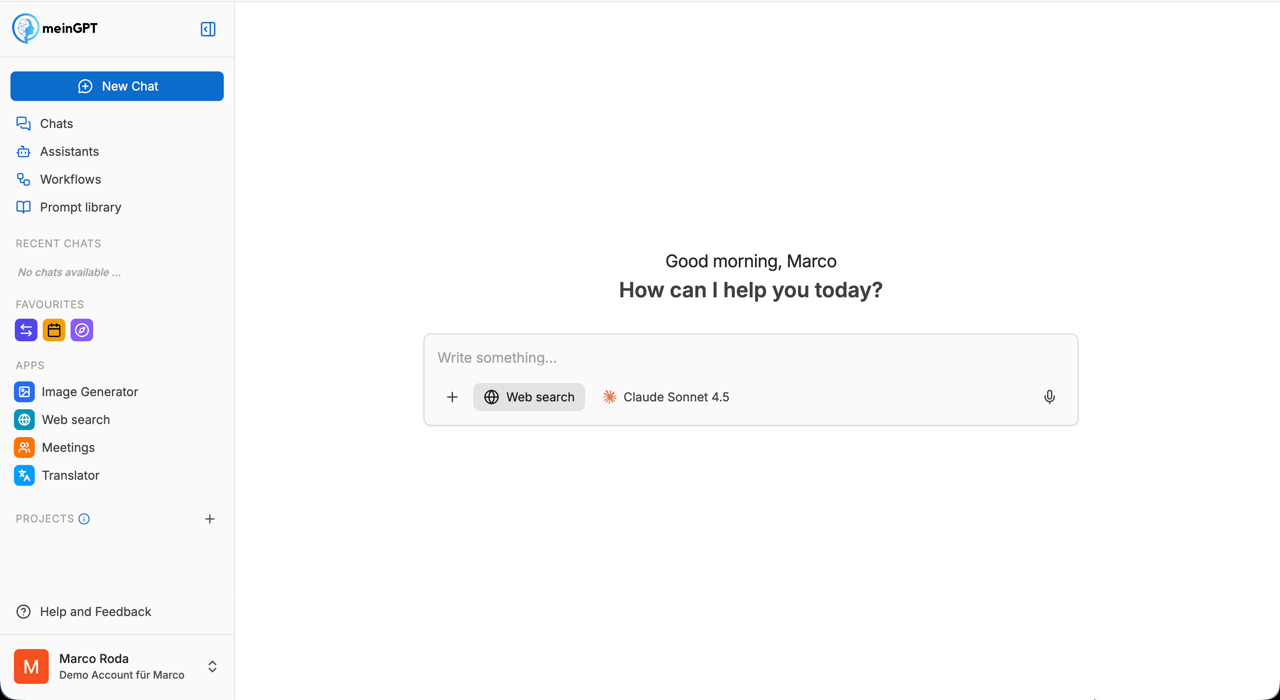
The Chat is the central tool of the MeinGPT platform. You type a question or task, the selected model answers, and with a few clicks in the input area you extend the chat with file uploads, web research, artifacts or saved prompts from the library.
Note
Chats are private. Only you see your own chats. The MeinGPT team has no access either, no automatic sharing happens.
Where to go next
Input area
Model selection, the "+" menu for sources and tools, voice input, sharing a chat and comfort features
Quote a passage
Select a passage in a response and ask about just that part, instead of retyping it
Quick Actions
Buttons under a response that apply a follow-up prompt with one click — default actions, creating your own, managing them
AI Models
Which models exist, what the EU flag means and which model fits when
Very long chats
When a chat gets very long, MeinGPT can automatically summarize older messages so the chat keeps working quickly and reliably — if your workspace admin has enabled this feature (it's off by default). When it's active, it can feel like the model "forgot" earlier details - from that point on, it works from a compressed summary rather than the full original text. MeinGPT visibly marks every point in the history where this happened with its own note, "Earlier messages were summarized to save context" – clicking it opens the full summary. If this note doesn't appear anywhere in your chat, no automatic summarization has taken place. If the earlier part of the chat included an image or a file, that attachment is no longer available to the model afterward, even though it's still visible in the chat history on screen. Because this also shrinks the context window, the in-chat cost warning can stop appearing too, even if the chat has already cost a noticeable number of credits overall - the warning estimates the cost of your next message from the current context size, not the sum of credits already spent.
Frequent questions
Does MeinGPT see my chat content?
No, content is private and visible only to you. The MeinGPT team has no access to individual chats. For model requests, your inputs are sent to the respective model provider (OpenAI, Anthropic, etc.) according to the contractually agreed data-protection terms.
Why do some models have an EU flag next to them?
The EU flag indicates the model is hosted in an EU region and is therefore GDPR-compliant. If data protection is a priority, prefer models with an EU flag.
Why does a request sometimes cost more than usual?
Reasoning models (e.g. with "Thinking" in the name) consume significantly more tokens per answer than standard models because they run several internal reasoning steps. Long requests or many files in the context also grow the token consumption.
What happens if I switch the model mid-chat?
The model switch only affects the next answer. The previous chat history is passed to the new model as context, so it knows what's going on. The behavior and tone may shift slightly depending on the model.
What happens if I edit an earlier message or regenerate an earlier response?
Every message that follows it in the chat disappears from the visible history — with no warning beforehand and no way to restore it from the interface. There's no versioning that lets you switch between the old and the new continuation. More on this: Editing a message and regenerating a response.
Quick Actions don't show up, what can I do?
Check three things: (1) is the Quick Actions feature enabled in the organization, (2) do you have at least one active Quick Action, (3) do you have the necessary permissions? If everything checks out, a page reload usually helps.
The assistant says it needs a few minutes and then nothing happens — why?
A chat response is always a single, self-contained answer to your message. If the AI writes something like "I'm starting now… give me 1-2 minutes, then you'll get the result," that's just the wording of the response itself — no background process is going to deliver you more content automatically afterward. Once the answer appears, that turn is over; only a new message from you starts the next one. This is different from a workflow, which is its own repeatable, savable process, or from the intermediate tool-call steps in Agent mode, which all happen within a single response and are already finished once you see it. If a task feels too big for one response, ask the assistant to break it into smaller steps you send one after another.
Why can't I sort search results by date?
The sort control (Newest, Oldest, Name A-Z, Z-A) only applies while you're browsing your chat list without a search term. As soon as you type something into the search box, MeinGPT switches to full-text search across chat titles and message content and orders the results purely by how well they match your search term — the sort control collapses and has no effect until you clear the search field.