Your own root certificate (CA)
Make the machine running the Outpost trust an internal root certificate when your network inspects TLS.
Many corporate networks inspect outbound HTTPS: a firewall or web proxy decrypts the connection and re-encrypts it with its own root certificate. To the Outpost this looks like a foreign certificate on bridge.meingpt.com — and it aborts, which is exactly what it should do.
To let it work anyway, the machine itself has to trust your root certificate. There is no setting for this in the Outpost — the certificate belongs in the operating system's own certificate store, on the machine running the Outpost.
How you know this is the problem
In the Connection tab you start the check with Run check. On the pairing step, a Check the connection button appears after a network or MeinGPT-response error. The TLS certificate check then fails and names the issuer — for the common appliances, by name, e.g. Zscaler Root CA. That is the unambiguous diagnosis; without it, a failed pairing is just as often a firewall rule or a proxy.
Before pairing, the machine does not yet know the Bridge host, so DNS, TCP, TLS and WebSocket are skipped. If a proxy is active, TLS certificate is skipped as well; an untrusted certificate then shows up in the MeinGPT reachable or Bridge host reachable row.
Check first, act second
Rolling out a root certificate because pairing does not work is guessing. Run the check: it tells you whether DNS, TCP, TLS, reaching MeinGPT or the system clock is the problem.
Setting it up
Get the certificate
Ask IT for the root CA certificate behind your TLS inspection, in PEM, CRT, or CER format.
If the chain consists of a root plus intermediates, the machine needs both — most rollout paths (group policy, MDM) already push the whole chain.
Add it to the operating system's certificate store
This is an operating-system setting, not an Outpost setting:
- Windows: usually already handled by group policy — whoever runs the TLS inspection typically rolls the root certificate out to managed machines anyway. Manually, use
certlm.msc→ Trusted Root Certification Authorities → Import Certificate. - macOS: import the certificate into Keychain Access (the System keychain), then set it to Always Trust under the certificate's Trust settings.
- Linux: place the certificate under
/usr/local/share/ca-certificates/(Debian/Ubuntu) or/etc/pki/ca-trust/source/anchors/(RHEL/Fedora) and runupdate-ca-certificatesorupdate-ca-trust.
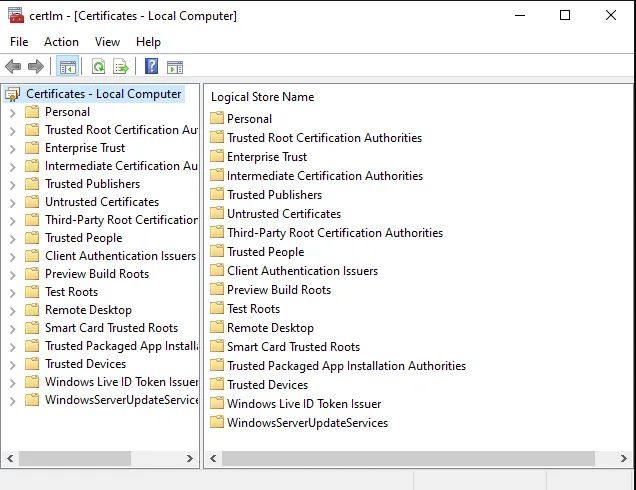
The Outpost reads this store at startup — the same one the machine's browser already trusts.
Run the check again
Restart the Outpost, then Run check. If TLS certificate passes, you are done; pairing works afterwards.
If the check stays red, the chain in the operating system is usually incomplete — ask IT for the intermediates and add them to the store as well.
What this affects
The operating system's certificate store applies to all outbound connections of the Outpost: the tunnel to MeinGPT, the MeinGPT API, your own embedding endpoint if you use one, and shared Microsoft SQL Server databases. Publicly trusted certificates stay untouched — your root certificate is added, it replaces nothing.
If your root certificate is already rolled out on the machine by group policy or MDM — the normal case on a managed corporate machine — you do not need this page: the Outpost trusts what the machine trusts, with nothing further to do.
Limits
- This applies to the machine, not only the Outpost. There is no way to scope the trust to the Outpost alone — changing the operating system's certificate store changes it for every application on that machine.
- A restart is required. The Outpost only picks up a newly imported certificate store on its next start.
- This is not a client certificate. If your proxy requires client-certificate authentication, that is a different case — talk to us (enterprise@meingpt.com).