Updates and channels
How an Outpost updates itself, what the Release or Beta channel changes, and what the status labels mean.
The Outpost keeps itself current
You do not need to start the check yourself. The Outpost checks shortly after startup and then about every six hours for a new version on your channel. When a new version has been published but is not yet approved for the device, it checks for approval again about every five minutes. It only downloads the version when the signed release list matches it and the downloaded file has exactly the expected checksum. If either does not match, the running version stays in place.
If the version is approved but its download fails — for example because a proxy or firewall blocks the installer file while the check itself gets through — the Outpost tries again after one hour and waits twice as long after each further failure (two hours, four hours, and so on), up to one day. If the running version has been withdrawn and must be replaced, it retries every five minutes instead. The desktop notification that an update is available appears only once per version. Once the path is open again, Check for updates in the System tab starts a new attempt right away. The button is there in every state except Downloading update, Update ready to install and Update required.
Folders, release levels, permissions and the search index survive an update. A routine update or channel switch does not require reinstalling.
Release or Beta
The channel applies to every paired Outpost in a workspace. You cannot switch it yourself — write to support@meingpt.com if your workspace should move to the other channel.
| Channel | What it is for |
|---|---|
| Release | The default. Versions that have been through the beta round. |
| Beta (earlier updates) | Signed builds earlier. Useful when you want fixes early or want to help verify them. |
Once we have switched the channel, it takes effect at the next successful check, normally within about six hours while connected; no reinstall is needed. A machine that already runs a newer version is not downgraded — it waits until the channel catches up.
Published is not the same as delivered
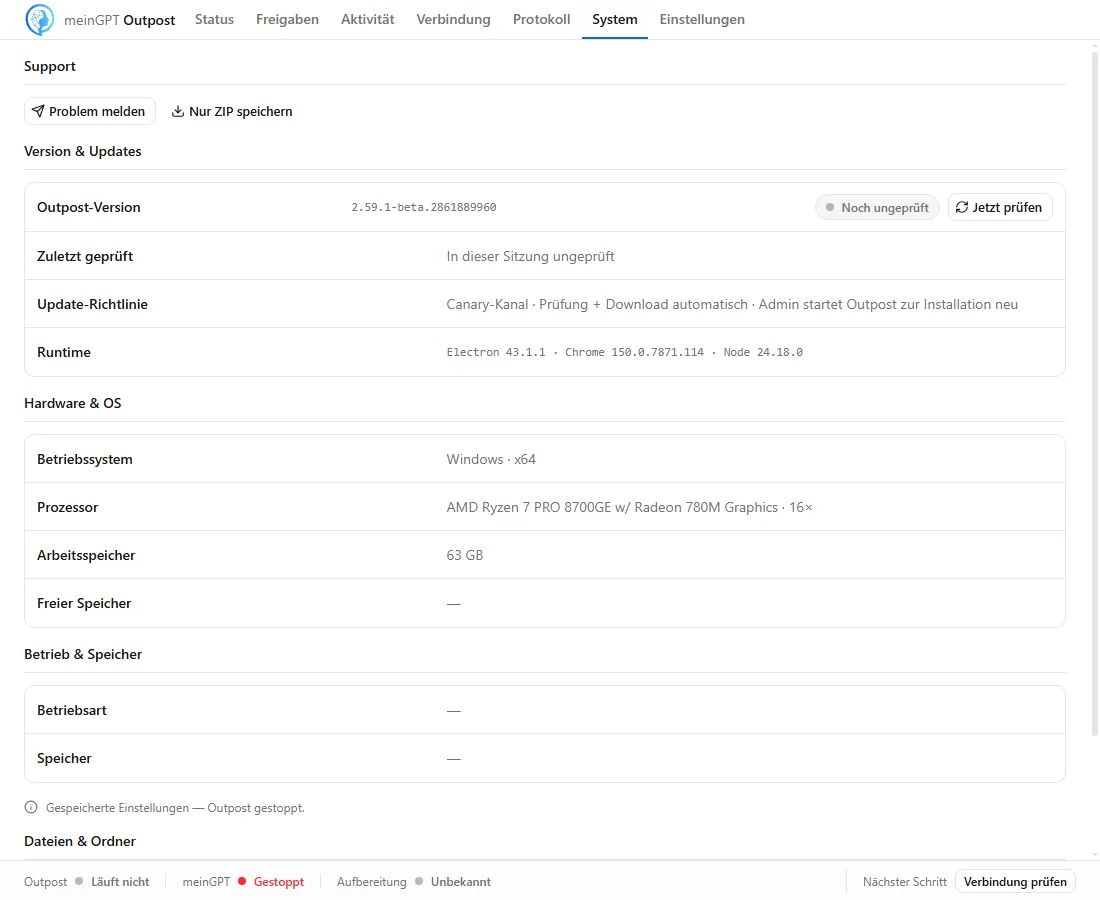
A version on your channel does not reach every device at once. MeinGPT releases it in waves, so that a fault does not hit the whole fleet. In the System tab you therefore see the rollout next to the version status:
- Waiting for v{version} — the version is published but not yet released for this device.
- Approved for v{version} — the device may download.
- This version is not yet released for this Outpost … — until then the current version keeps working normally; the Automatic update policy below it says how it is installed afterwards.
- Release status could not be retrieved — the Outpost asks again by itself.
- New candidate needs a new campaign — the running rollout covers an older build; the newly published version needs its own rollout.
- New releases do not support this Windows version — the device runs a Windows version that new releases no longer support; it stays on its version and receives no automatic updates.
The version status itself shows Up to date, Update available, Downloading update, Update ready to install or Checking for updates failed. Install & restart appears at Update ready to install, that is, once the version is downloaded and verified. If the Outpost runs as a Windows service, the service installs it by itself without a click.
Update available, but no install button?
Then there is nothing to do. While the version waits for its release, there is deliberately no install button here. Once it is released, the Outpost downloads and verifies it by itself. If it runs as a Windows service, the service installs it without a click; otherwise Install & restart appears and you start the installation with it. Check for updates only asks for the release again; it does not force an update.
Attention
Reinstalling is not needed for this and skips the staged release. That staging is what keeps a faulty version from reaching every device at once.
An available update is also not the reason when MeinGPT shows an Outpost as Unreachable. What helps then is under Status in MeinGPT.
When a new version does not start
If the new version does not come up cleanly, the Outpost returns to the previous one by itself and resumes serving with it. The slot reserved for this and what it holds is described under Where which data lives.
If the installer refuses the device because Windows is too old or the Microsoft Visual C++ Redistributable (x64) is missing, it changes nothing: the service starts again by itself on the current version, and the System tab names the reason. The Outpost does not download that same version again on this device.
If a device stays on Checking for updates failed for days, a blocked outbound path is one possible cause among several — a manifest signature that fails verification or an update the install gate refuses show the same status. Run the checklist under When something breaks; if that does not explain it, write to support@meingpt.com with the device name and when it started.