Status in MeinGPT
What the status label on an Outpost card under Settings → Outposts means, and what to do about each one.
Under Settings → Outposts, every Outpost has its own card. The top right corner shows the state MeinGPT currently sees it in. Only workspace admins can see this page.
Where the status comes from
While the page is open, MeinGPT queries each Outpost directly every 15 seconds. The label is a live measurement, not a stored value — once you close the page, nothing is measured.
The measurement answers two questions:
- Does MeinGPT reach the machine? The request travels over the connection the Outpost itself opened to the outside.
- Does the Outpost report its folders as fine? This refers to the last sync of all shared folders on the machine.
The status says nothing about whether a single document can be found. That is what the console on the machine is for — see Console & operations.
The labels
Connected
Green dot. MeinGPT reaches the Outpost, and every folder finished its last sync without errors. Nothing to do.
Reachable · limited operation
Yellow dot. MeinGPT reaches the Outpost, and search works. But at least one folder reports a problem, or a newly shared folder is still waiting for its first pass.
Typical causes:
- not enough free disk space on the machine
- a shared folder no longer exists or can no longer be read, for example a network drive that is not mounted
- a sync was aborted or could not process some files and will be retried
What you do: In the Outpost on the machine, open the Activity tab, or Folder activity in the affected folder under Shares. It states the reason, such as "Insufficient free disk space" or "Folder no longer exists". Right after you share a folder, this label is normal; it switches to Connected once the first pass is done.
Unreachable · last seen …
Red dot. MeinGPT did not reach the Outpost in the last measurement. The date shows when the machine last reported. While this lasts, the documents from this Outpost are missing from search and chat; the rest of MeinGPT works as usual.
The reason appears directly below the status label:
| Reason | Meaning |
|---|---|
| The check timed out | The Outpost did not answer in time. Often the machine is busy, asleep, or the service is stuck. |
| MeinGPT could not reach this Outpost | There is no connection from the machine to MeinGPT. |
| The check failed unexpectedly | An error that fits neither of the two groups. |
An available update is not the cause. Do not reinstall the Outpost; restart it, as described in the third step. One exception: if the Update required window appears, this version has been retired and a restart does not help. Choose Install and restart there.
What you do:
Is the machine running?
Check that the machine is on and not asleep. An Outpost should run on a machine that stays switched on.
Is the Outpost service running?
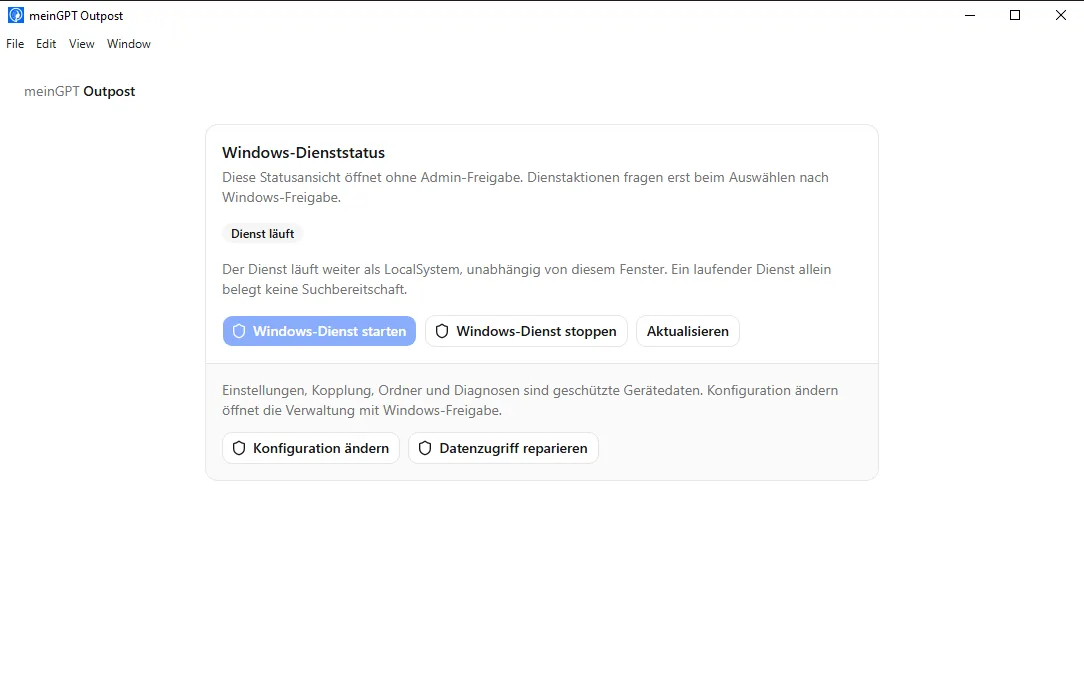
The status bar at the bottom of the Outpost window shows whether the local service is running and whether MeinGPT is connected. If it is not running: Start the Outpost. On Windows, you can see the service status without administrator approval.
Restart the Outpost
If the service is running but MeinGPT still cannot reach the Outpost, restart it. On Windows, open the Windows service status and choose Stop the Windows service, then Start the Windows service; both ask for Windows approval. Alternatively, restart the machine. Closing the window is not enough, because the Outpost keeps running in the background. On macOS and Linux, quit it from the icon in the menu bar or notification area (entry Quit) and open it again.
Run the network check
In the Connection tab, the Outpost checks DNS, TCP, TLS, proxy, MeinGPT reachability and system time one by one. The failed line names the cause.
Send diagnostics to support
If the label stays red, export the diagnostics in the System tab and send them to support.
Never connected
Empty circle. The Outpost was created in MeinGPT, but no machine has reported for it yet. This is not a network problem — the setup is not finished.
What you do: Install the Outpost program on the machine. It shows an eight-character code. Enter it on the card via Approve device and compare the fingerprint sentence character by character with the one on the machine's screen. Details: Setting up an Outpost.
Labels about the measurement itself
The following labels say nothing about the Outpost, only that MeinGPT has no fresh measurement right now. All of them are yellow and come with a Retry status check button.
| Label | Meaning |
|---|---|
| Checking | The page has just opened and the first measurement is still running. |
| Status check failed | The query itself failed, for example because your browser was briefly offline. With a time, you see when the last successful measurement was. |
| Status outdated · last measured … | The last measurement is older than 90 seconds. MeinGPT then stops showing an old green. |
| Retrying status check … | A new measurement is running. |
What you do: Click Retry status check. If the label stays, reload the page. Only if Unreachable appears after that does the problem lie with the Outpost.
Release paused
If the card shows Release paused, an admin chose Pause release from the card's menu. The machine keeps running, keeps indexing and stays paired — but nothing leaves any folder on this Outpost, neither passages nor original files. The connection status can still show Connected at the same time. Undo it with Resume release.
Status in MeinGPT and in the console
The two labels measure from different directions and can briefly differ:
- MeinGPT asks: does my request reach the Outpost, and does it answer?
- The console on the machine shows: is my connection to MeinGPT up, and how are my folders doing in detail?
If the console shows connected but MeinGPT shows Unreachable, note both labels with the time and export the diagnostics. That is a case for support, not for your firewall.