Outpost does not start
Collect logs and check likely causes when no Outpost window appears.
If no window or console appears, you do not need the application to diagnose it.
1. Open the logs
Enter this in the Windows Explorer address bar:
%LOCALAPPDATA%\meinGPT Outpost\logsOn macOS and Linux the subfolder is called logs as well; where the data folder itself lives on those systems is under Where the Outpost stores data.
main-process.jsonl records startup before a window exists. The same folder holds outpost-core.log and compatibility logs from older installations; an older rotation ends in .1. Copy the folder before reinstalling or changing files. Raw logs can contain file names and paths.
Migrated or managed installations may use a different data folder - including when this machine already has a machine-wide folder: %ProgramData%\meinGPT Outpost on Windows. In that case the Outpost automatically uses that folder instead of %LOCALAPPDATA%. Without a running application you cannot check the System tab that would otherwise be authoritative - if you find nothing under %LOCALAPPDATA%\meinGPT Outpost\logs, also check %ProgramData%\meinGPT Outpost\logs. For every possible location and its contents, see Where the Outpost stores data.
2. Create a diagnostics bundle without a window
Open meinGPT Outpost - Collect diagnostics from the Windows Start menu. This entry starts neither a window nor the Outpost core. The console prints the ZIP path; the file is stored here:
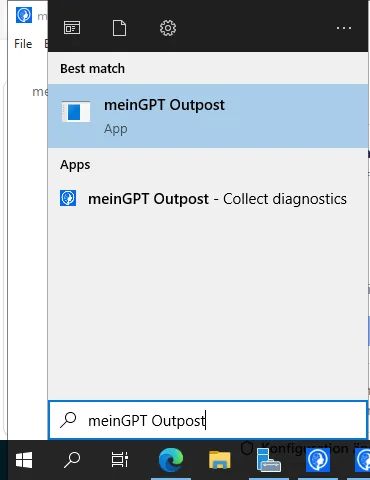
%LOCALAPPDATA%\meinGPT Outpost\diagnosticsAs with the logs above, this assumes the standard per-user data folder. On a migrated or managed installation that already uses the machine-wide folder, the bundle is written to %ProgramData%\meinGPT Outpost\diagnostics instead - check there if nothing appears under %LOCALAPPDATA%.
Only the Windows installer creates that Start menu entry. On macOS and Linux you trigger the same collection by starting the application from the command line with --collect-diagnostics; it prints the ZIP path to standard output and stores the file in the diagnostics subfolder of the data folder. On macOS that is:
"/Applications/meinGPT Outpost.app/Contents/MacOS/meinGPT Outpost" --collect-diagnosticsOn Linux you start the downloaded AppImage itself, from the folder you put it in. Its file name carries the version, which is what the * stands in for:
./"meinGPT Outpost"-*.AppImage --collect-diagnosticsIf this entry does not run either, preserve the logs and check your security product's quarantine first.
If an error appears instead of a blank screen
If startup reports "Console unavailable," stating that the local console exited unexpectedly while the Outpost service keeps running independently, that is a different case: the display (the "console") and the background service are two separate processes, and only the display has crashed here. Steps 1 and 2 above still apply — you can collect logs and a diagnostics bundle regardless of the console's state.
Opening the console does not require "Run as administrator". On Windows, the service status view opens without administrator rights; installation, repair, starting and stopping the service and every configuration change — sharing a folder included — ask for Windows approval (see Installation privileges). If this message only occurs on an elevated launch, tell support that together with the diagnostics bundle — that is a distinct signal for us.
If the machine is a Mac
Three causes exist only on macOS, and they come before the list further down: with them either no process ever runs — in which case no log folder appears — or the application is no longer where it was started from.
-
The Mac has an Intel processor. There is exactly one macOS build and it is made for Apple Silicon. On an Intel Mac, macOS refuses to open it and reports that the application is not supported on this Mac; started from a terminal, the same attempt ends in
Bad CPU type in executable. Rosetta does not help — it translates in the other direction. Check it on the machine: Apple menu → About This Mac, under Chip it has to say "Apple M…"; in a terminal,uname -mthen printsarm64and notx86_64. Otherwise use a Windows or Linux machine for this Outpost — the application is the same on all three. -
The application is not in the Applications folder. Started straight out of the mounted disk image, it runs from a read-only, temporary location: as soon as the image is ejected — at the latest on the next restart — there is nothing left to start. It cannot update itself from there either, because doing so means overwriting itself. How you can tell if it did run in between:
main-process.jsonlrecords anexecPathfield at startup with the location of the running copy. If that is not/Applications/meinGPT Outpost.app/…, it is not installed. Open the disk image, drag the application into Applications, eject the image and start it from there. The data folder is untouched by this — it lives under~/Library/Application Support, not inside the application. -
The copy did not come from the original disk image. The shipped application is signed with a Developer ID certificate, notarized by Apple and carries the ticket stapled into it — which is why it opens on a plain double-click even without internet access. If the
.dmgis unpacked internally, re-zipped and passed around over a file share, the application bundle often does not survive it: symlinks and extended attributes are lost, the signature no longer matches, and macOS reports the application as damaged instead of starting it. Whether a copy is still intact is answered by the same two commands our build runs before every release:spctl -a -vvv -t exec "/Applications/meinGPT Outpost.app" xcrun stapler validate "/Applications/meinGPT Outpost.app"The first has to report
acceptedandsource=Notarized Developer ID, the secondThe validate action worked!. If it does not, download the disk image from MeinGPT again and drag the application out of it into Applications afresh. Do not work around the message withxattr -cr: that only strips the provenance marker and hides exactly the integrity failure you have just found.
If it is none of the three, the list below applies unchanged — proxy, firewall, occupied ports, system clock and a data folder on a network drive behave on macOS as they do on Windows. Read %LOCALAPPDATA%\meinGPT Outpost there as ~/Library/Application Support/meinGPT Outpost.
If the window opens but the Outpost stops right after starting
The console then names the reason under Status, with a technical line underneath. Three reasons lie on the Windows machine itself, not in the Outpost:
-
Visual C++ Redistributable too old: The technical line names the installed and the required version (14.38 or newer). Install the current version from aka.ms/vc14/vc_redist.x64.exe, then restart the Outpost. It does not try again on its own.
-
Visual C++ Redistributable missing: The technical line names the missing files. Same fix as above.
-
A program file is blocked: The technical line names the file Windows was not allowed to load. Usually security software locked it or moved it to quarantine, or an application control policy (AppLocker, WDAC) forbids it. Have exactly that file allowed and restart the Outpost. The native program files are in the installation folder (by default
C:\Program Files\meinGPT Outpost) under:resources\outpost-core\node_modules\onnxruntime-node\bin\napi-v6\win32\x64\ resources\outpost-core\node_modules\@anush008\tokenizers-win32-x64-msvc\ resources\outpost-core\node_modules\@xberg-io\xberg-win32-x64-msvc\
The diagnostics bundle contains the installed Visual C++ version, even when no window opens.
Likely causes — in this order
- Antivirus or EDR: Defender, CrowdStrike, and similar products may block the Outpost's native Node addons or hold
data\outpost.sqliteopen. Ask the security team to inspect quarantine and events; do not blindly exclude the entire folder. - Proxy or TLS inspection: A corporate proxy can stop the outbound tunnel at certificate validation. Once the window opens again, run the check under Connection. For a private CA, see Your own root certificate. The check reads the
HTTPS_PROXYandHTTP_PROXYenvironment variables first (lower-case spellings too). If none are set, it asks the operating system's proxy selection, the same one the Outpost window uses (system settings, PAC, WPAD, group policy). If the Proxy row says "No proxy configured", it found neither a variable nor a system proxy. When a proxy is active, TCP and TLS are not probed directly; reachability is checked through the proxy. Since version 2.65.0, the permanent connection to MeinGPT uses the same proxy selection as pairing. If pairing works but the connection then stalls, update an older Outpost first. If it persists, check whether your proxy lets the permanent connection through (WebSocket over HTTPS tobridge.meingpt.com) and whether TLS inspection breaks it open with its own certificate. - Outbound firewall: The Bridge host must be reachable outbound. The exact allowlist is under Connection → Network requirements; no inbound ports are required.
- Local port blocked: The Outpost automatically falls back to a free loopback port. One occupied port is therefore not enough; look for rules or software that prevent local binding altogether.
- Data folder moved: Do not move the Outpost data folder onto SMB, a network drive, or a OneDrive-synced folder. SQLite and automatic recovery require a local disk. The path actually in use is included with the system details in a diagnostics bundle.
- Invalid environment variable: In a managed installation,
MEINGPT_OUTPOST_APP_DATA_DIRcan redirect the data folder to a different path - see Where the Outpost stores data. An invalid value (empty, relative, a drive that does not exist) makes the storage layer fail before the window even appears. Check the value actually set and the path shown under System. - Permissions: The account running the Outpost needs read and write access to the data folder actually in use.
- Wrong system time: A badly skewed clock can make certificates, pairing, and tokens appear invalid. The connection check warns at two minutes.
- Sleep or Windows Update: If the machine slept or restarted during indexing, wake or restart it and open the Outpost again; the run continues after recovery.
What to send support
Send the ZIP, the time of the failure, and a short description to enterprise@meingpt.com. It contains system and version details, redacted configuration, recovery state, and bounded log excerpts. It collects no document files or document content. Because it includes log excerpts, however, the current version may contain file names, paths, or search text; review the ZIP under your policy.