Ordner auf diesem Rechner
Einen lokalen Ordner oder ein gemountetes Netzlaufwerk mit einer MeinGPT-Datenquelle verbinden.
Das ist der häufigste Fall und der, für den es den Outpost gibt: ein Ordner liegt auf dem Rechner (oder ist dort als Laufwerk gemountet), und MeinGPT soll darin suchen können. Quelle und Suchindex bleiben dort; was eine Anfrage verlässt, legt ihr pro Ordner am Outpost fest.
Nur mit einem eigenen Outpost
Ordner auf einem Rechner kann nur ein Outpost lesen. Ohne eigenen Outpost gibt es diesen Quellentyp nicht — dann bindet ihr eure Ablage in MeinGPT direkt an (SharePoint, Google Drive, S3 …).
Es sind zwei Schritte, an zwei Orten
Die Verbindung entsteht aus zwei Hälften, und die Reihenfolge ist nicht beliebig:
| Wo | Was | |
|---|---|---|
| 1 | Im Outpost | Ordner freigeben — Pfad wählen, Datenabruf und lokalen Quellzugriff festlegen. |
| 2 | In MeinGPT | Den gemeldeten Ordner unter Freigaben übernehmen, benennen und anschließend über Zugriff freigeben. Erst das entscheidet, wer ihn finden darf. |
Der Rechner meldet seine Ordner selbst; MeinGPT kann nur übernehmen, was gemeldet wurde. Die Datenquelle in MeinGPT weiß nicht, wo der Ordner liegt — das steht nur auf dem Outpost-Rechner. Der Outpost weiß nicht, wer suchen darf — das steht nur in MeinGPT.
Eine Einstellung, ein Eigentümer
Datenabruf und Quellzugriff werden ausschließlich am Outpost gesetzt. MeinGPT zeigt nur die zuletzt vom Gerät gemeldeten Werte und kann sie weder ändern noch erweitern. In der Plattform verwaltet ihr Übernahme, Name, Nutzerzugriff und eine gegebenenfalls engere Tool-Richtlinie.
Ordner im Outpost freigeben
Reiter Freigaben → Freigeben → Einen Ordner.
Der Pfad muss absolut sein — C:\Daten\Angebote oder /srv/dokumente. Ordner wählen öffnet den Dateidialog des Betriebssystems.
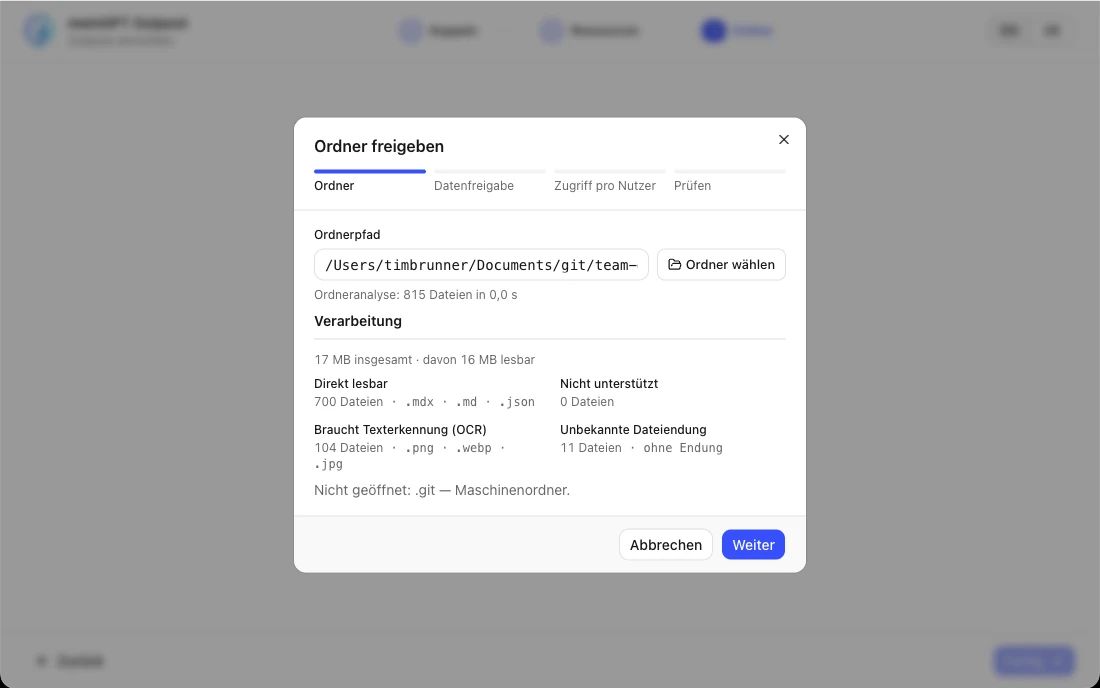
Direkt danach fragt derselbe Assistent, in zwei weiteren Schritten, nach Datenfreigabe und Quellzugriff — das sind die beiden nächsten Schritte hier auf dieser Seite. Es gibt keine ID einzutippen: Der Rechner meldet den Ordner selbst an MeinGPT, sobald ihr gespeichert habt.
Festlegen, wie viel er herausgibt
Öffnet die Zeile des Ordners. Ganz oben steht Was dieser Ordner herausgibt:
| Stufe | Was zu MeinGPT reist |
|---|---|
| Nur Text (Voreinstellung) | die gefundenen Textstellen samt angrenzendem Text. Die Dateien bleiben auf diesem Rechner. |
| Text und Originaldateien | zusätzlich die Datei selbst — sie verlässt dann den Rechner. |
Die Entscheidung fällt hier und nicht in MeinGPT: Wer den Ordner bindet, ist die Person, die weiß, ob dessen Dateien das Haus verlassen dürfen. Die Plattform zeigt diese Gerätemeldung nur an.
Quellzugriff festlegen
Nur lesen ist die Voreinstellung. Lesen und schreiben erlaubt MeinGPT, kleine Textdateien im freigegebenen Ordner ausdrücklich zu erstellen, zu bearbeiten, umzubenennen oder wiederherstellbar zu löschen. Datenabruf und Quellzugriff sind unabhängig: Originaldateien abrufen zu dürfen erteilt kein Schreibrecht.
Der Outpost prüft beim Speichern die Betriebssystemrechte und vor jeder Änderung noch einmal die aktuelle lokale Regel und den Zielpfad. Erstellen und Umbenennen überschreiben nichts; vor Bearbeiten und Löschen bleibt die vorherige Datei im lokalen Wiederherstellungsbereich. Die Plattform kann diese lokale Obergrenze nur weiter einschränken.
In MeinGPT übernehmen und freigeben
Einstellungen → Outposts → Verwalten → Freigaben. Der gemeldete Ordner steht dort mit seinem Pfad. Als Quelle nutzen, Namen vergeben — ab da ist es eine Sammlung wie jede andere.
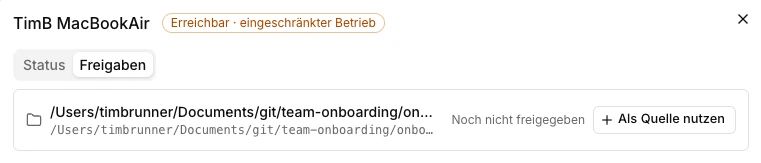
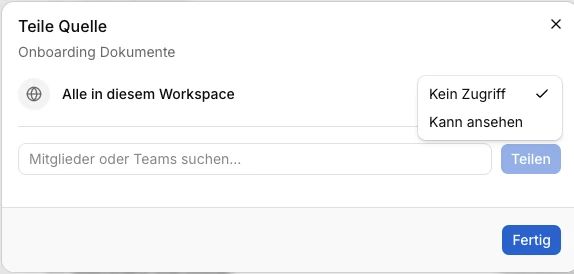
Sichtbar ist sie damit noch nur für Workspace-Admins. Klickt in der Liste der Dokumentbestände auf Zugriff und tragt die Personen oder Teams ein, die damit arbeiten dürfen, oder gebt sie für alle im Workspace frei — erst das entscheidet, wer die Dokumente findet. Assistenten selbst lassen sich nicht eintragen; wie das mit Assistenten zusammenspielt, steht unter Wer sieht was.
Indexieren lassen
Läuft der Outpost, beginnt der Abgleich von selbst. Steht die Statusleiste unten auf Gestoppt, passiert nichts — dann erst Start. Die Zeile unter Freigaben zeigt nur, ob der Ordner schon nutzbar ist. Öffnet den Ordner und wechselt zu Pipeline, um Dateiscan, Textextraktion beziehungsweise OCR sowie Stichwort- und Vektorindex einzeln zu verfolgen.
Netzlaufwerke
Ein Netzlaufwerk geht als lokaler Ordner, wenn es aus Sicht des Outpost-Prozesses dauerhaft gemountet ist:
- Windows: ausschließlich ein UNC-Pfad (
\\server\freigabe\ordner). Ein verbundener Laufwerksbuchstabe (z. B.Z:\) wird von Outpost grundsätzlich abgelehnt, unabhängig davon, unter welchem Konto Outpost läuft — Outpost läuft als Hintergrunddienst, für den verbundene Laufwerksbuchstaben nicht sichtbar sind. Details zu SMB-Freigaben. - Linux: ein Mountpoint aus
/etc/fstab, der den Neustart übersteht.
Der Ordner muss für das Konto lesbar sein, unter dem der Outpost läuft. Gebt ihm nur dann Betriebssystem-Schreibrechte, wenn ihr für genau diesen Ordner auch Lesen und schreiben im Outpost aktiviert.
Was gelesen wird, und was nicht
Der Outpost liest den Ordner einschließlich Unterordnern und erkennt bei späteren Läufen neue, geänderte und gelöschte Dateien.
Der Outpost überwacht freigegebene Ordner fortlaufend über eine Dateisystem-Überwachung und führt zusätzlich alle 30 Sekunden einen vollständigen Abgleich durch, sodass neue, geänderte oder gelöschte Dateien in der Regel innerhalb weniger Sekunden erkannt werden. Über „Alles erneut lesen“ unter Freigaben lässt sich jederzeit ein sofortiger, vollständiger Neuscan auslösen.
Unterstützte Dateiformate:
| Format | Wie der Text herauskommt |
|---|---|
.pdf | Text- und Layoutextraktion, bei Scans Texterkennung |
.docx | Text samt Kopf- und Fußzeilen, Kommentaren, Fuß- und Endnoten und Linkzielen; zusätzlich Texterkennung auf enthaltenen Bildern |
.pptx | Folientext samt Sprechernotizen, Diagramm- und SmartArt-Text und Linkzielen; zusätzlich Texterkennung auf enthaltenen Bildern |
.doc, .xls, .xlsx, .odt, .ods, .odp, .eml, .msg | reiner Text, ohne Texterkennung |
.txt, .md, .rst, .html, .htm, .csv | reiner Text, auch in älteren Zeichenkodierungen wie Windows-1252 |
.png, .jpg, .jpeg, .tif, .tiff, .bmp, .webp, .heic | ausschließlich Texterkennung |
Weitere reine Textformate wie .json, .yaml, .log, .py, .ts oder .js liest der Outpost ebenfalls, auch ohne eigene Zeile in dieser Tabelle.
Was er nicht verarbeiten kann, überspringt er — und das ist der Punkt, der über die Antwortqualität entscheidet. Öffnet den Ordner unter Freigaben. Unter Quelldateien stehen die betroffenen Dateien mit dem konkreten Grund; Pipeline zeigt Ausnahmen beim Aufbau der Suchindizes.
Typische Ausnahmen und was sie bedeuten:
.zip,.tar,.7z,.rar— Archive werden nicht ausgepackt, gleich in welchem Format. Liegt das Angebot in einem Archiv, findet es niemand..msg— einzeln exportierte Outlook-Mails. Für ganze Postfächer gibt es aktuell keine eigene Quelle — nur einzeln exportierte Nachrichten werden gelesen.ohne Endung,.exe,.dll,.pyc— kein Text drin, korrekt übersprungen.- Videos (
.mp4,.mov,.avi…) — kein Text, der ohne Weiteres extrahierbar ist. - Audiodateien (
.mp3,.wav…) — ebenfalls kein Text. - Fotos ohne Text — Bilddateien liest der Outpost per Texterkennung, durchsuchbar wird nur der Text darauf. Ein Foto ohne Beschriftung liefert keinen Treffer. Details: Bilder aus einem Datenpool.
- Inhalt passt nicht zur Dateiendung — etwa ein Foto, das als
.htmgespeichert wurde. Der Outpost erkennt das an den ersten Bytes der Datei und nimmt sie nicht in den Index auf, statt ihren Binärinhalt als Text zu lesen. War eine frühere Fassung indexiert, bleibt diese durchsuchbar. - Texterkennung konnte den Scan nicht lesen — die Texterkennung traut ihrem eigenen Ergebnis nicht, etwa bei einer auf dem Kopf stehenden Seite. Der Outpost meldet die Datei dann als fehlgeschlagen, statt unleserlichen Text in den Index zu stellen. Das gilt schon, wenn eine einzelne Seite unlesbar ist; eine früher indexierte Fassung bleibt durchsuchbar.
Grenzen pro Datei
Damit eine einzelne Datei den Rechner nicht auslastet, gelten für jede Datei feste Grenzen:
| Grenze | Wert | Gilt für |
|---|---|---|
| Dateigröße | 32 MB (32 MiB, genau 33.554.432 Byte) | alle Formate außer .txt, .md, .rst |
| Dateigröße für reinen Text | 10 MB (10 MiB) | .txt, .md, .rst |
| Lesezeit | 60 Sekunden pro Versuch, höchstens 2 Versuche | alle Formate, Texterkennung eingeschlossen |
| Texterkennung in gescannten PDFs | 50 Seiten | PDFs ohne eigene Textebene |
| Ausgelesener Text | 10 MB (10 MiB) pro Datei | alle Formate |
Was bei einer Überschreitung passiert:
- Zu groß: Eine Datei über der Größengrenze liest der Outpost gar nicht erst. Unter Quelldateien steht dann „Datei ist größer als das Limit von 32 MB.“ (bei reinem Text 10 MB), in MeinGPT „größer als das Dateigrößenlimit des Outposts“.
- Zu langsam: Dauert das Lesen länger als 60 Sekunden, bricht der Outpost den Versuch ab und liest die Datei beim nächsten Durchlauf noch einmal. Nach höchstens zwei Versuchen an der unveränderten Datei gibt er sie auf — auch Versuche, die aus einem anderen Grund fehlgeschlagen sind, zählen mit: „Lesen dauerte länger als 60 Sekunden. Nach 2 Versuchen ohne Dateiänderung stoppt Outpost.“ Wie lange das Lesen dauert, hängt vom Rechner ab — ein PDF mit mehreren tausend Seiten kann die Zeitgrenze auch unter 32 MB erreichen.
- Andere Grenzen — Seitenzahl bei der Texterkennung, Menge des ausgelesenen Texts, die Entpackgrenzen für Office-Dateien — erscheinen als „Datei überschreitet ein Verarbeitungslimit.“
Eine aufgegebene Datei versucht der Outpost nicht immer wieder, und die Dateien dahinter werden normal weiter gelesen. War eine frühere Fassung der Datei schon durchsuchbar, bleibt diese in beiden Fällen auffindbar, bis eine lesbare Fassung gespeichert wird. Wird die Datei geändert — geteilt, verkleinert oder ersetzt —, liest er sie automatisch neu, wieder mit zwei Versuchen. Das seitenweise Einlesen sehr großer Dokumente ist geplant.
Ein Ordner, den ihr freigebt, ist für alle offen, die die Datenquelle sehen
Datei- und Verzeichnisrechte wandern nicht mit. Wer diese Datenquelle in MeinGPT sehen darf, findet jedes Dokument darin — auch jemand, der den Ordner im Explorer nicht öffnen könnte. Prüft das vor der Freigabe, nicht danach.
Eine Ausnahme gibt es als Beta-Funktion: Windows-Nutzerrechte (Beta) kann pro Workspace aktiviert werden und sorgt dafür, dass bei Suche, Download und Dateiänderungen die echten NTFS-Berechtigungen der einzelnen Nutzer:innen gelten — aber nur für Ordner, die als lokaler NTFS-Ordner auf diesem Rechner selbst eingebunden sind. Netzlaufwerke und über UNC-Pfad eingebundene Freigaben sind von dieser Funktion ausgenommen; für sie gilt weiterhin die Regel oben. Sprecht euren Ansprechpartner an, wenn ihr diese Beta-Funktion testen möchtet. Einrichtung und Grenzen: Wer sieht was.
Die erste Suche in MeinGPT
Sobald der Ordner übernommen ist und der Outpost Läuft meldet, ist er eine Datenquelle wie jede andere — der Weg dorthin führt nicht mehr über den Outpost.
Indexierung abwarten
Unter Freigaben → Ordner siehst du, wie viele Dateien gelesen und indexiert sind. Bei großen Beständen dauert der erste Durchlauf; suchbar ist jede Datei, sobald sie im Index steht.
Im Chat anhängen oder einem Assistenten geben
Für einen einzelnen Fall hängst du die Datenquelle direkt im Chat an. Soll ein Team dauerhaft darauf arbeiten, hinterlegst du sie als Wissen an einem Assistenten. Als Wissen hinterlegt heißt noch nicht freigegeben — ein Workspace-Admin muss die Datenquelle den Nutzerinnen und Nutzern des Assistenten zusätzlich unter Einstellungen → Datenquellen freigeben.
Mit einem Begriff prüfen, den es nur dort gibt
Nimm für den ersten Test einen Begriff, der garantiert aus diesem Ordner stammt — eine Belegnummer, einen Projektnamen. Kommt die Antwort mit Quellenangabe zurück, funktioniert die Kette vom Rechner bis in den Chat.
Wer die Quelle sehen darf, entscheidest du in MeinGPT unter Einstellungen → Datenquellen; was hinter einer Quellenangabe geöffnet werden kann, hängt an der Freigabestufe des Ordners. Beides im Detail: Datenquellen (RAG).
Wenn nichts indexiert wird
- Statusleiste: steht dort
Läuft? Sonst Start. - Freigaben → Ordner → Quelldateien: steht dort der erwartete Pfad, und welche Datei meldet welchen Fehler?
- Freigaben → Ordner → Aktivität: der fehlgeschlagene Abgleich nennt Ursache und nächsten Schritt.
- Pipeline: sind Dateien bei Textextraktion, Stichwort- oder Vektorindex ausgefallen, steht die Ausnahme beim betroffenen Schritt.