Bubble
Workflows

Integrating Bubble.io with meinGPT Workflows: The Ultimate Guide to No-Code AI Automation

Supercharge Bubble: Support it development cycles with our AI Workflows via Make.com.

In today's digital business world, combining no-code development with artificial intelligence is a decisive competitive advantage. Bubble.io, the leading no-code platform, and meinGPT, a GDPR-compliant AI solution, together provide a powerful ecosystem for companies looking to optimise their processes. This blog post shows how integrating Bubble.io with meinGPT Workflows lets you build innovative, efficient automation solutions – without writing a single line of code.

Why integrate Bubble.io with meinGPT Workflows?

Bubble.io, one of the most popular no-code platforms, has made a name for itself in application development. The platform is used by over 700,000 users to build applications without programming knowledge, and observers expect user numbers to grow substantially further as the no-code approach spreads. Almost any user can build an application or a website with Bubble. The wide range of possibilities and options benefits both companies and their departments as well as private users. Bubble.io has an intuitive structure and some fairly sophisticated capabilities that make it possible to realise even large projects.

Bubble offers a graphical user interface that lets users work with drag-and-drop elements, implement logic and integrate databases without writing a single line of code. This makes the platform particularly appealing for founders, entrepreneurs and small businesses who want to quickly build an MVP (Minimum Viable Product).

Integrating Bubble.io with meinGPT Workflows unlocks unique synergies and opens up new possibilities for businesses:

Functional areaWhat Bubble.io offersWhat meinGPT addsCombined value
Data processingVisual data modelling, simple database functionsAI-powered data analysis, text recognition and processingIntelligent data analysis and preparation with minimal configuration
User interactionIntuitive user interfaces, visual elementsNatural language processing, conversational AIApplications with AI-powered, natural-language interactions
AutomationWorkflow control, conditional actionsContext-dependent AI decisions, pattern recognitionComplex automation scenarios with adaptive AI intelligence
IntegrationAPI connections to external servicesGDPR-compliant AI processing, multiple AI modelsData-protection-compliant AI connectivity with extended integration options

While Bubble.io enables the development of web-based applications without programming knowledge, meinGPT brings advanced AI capabilities and GDPR compliance into this equation. Combining both platforms lets companies build innovative solutions that are both user-friendly and intelligent.

About meinGPT – The GDPR-compliant AI platform

meinGPT is an AI platform optimised specifically for German and European companies, offering GDPR-compliant access to state-of-the-art AI technologies. As a central platform for all AI applications, meinGPT unites various models and functions in a secure environment hosted in Europe.

The main benefits of meinGPT include:

meinGPT Workflows let companies automate recurring tasks and structure complex processes. Each workflow consists of a series of predefined steps carried out by the AI, with different models available for different requirements:

Workflows become particularly powerful through integration with third-party services such as Bubble.io, which connects AI workflows with your existing applications.

Key use cases: Bubble.io and meinGPT in action

AI-powered customer enquiry processing

The challenge: Many companies struggle to efficiently process and categorise customer enquiries from various channels. Manual handling is time-consuming and prone to error.

The solution with Bubble.io + meinGPT: An integrated solution that captures customer enquiries via a Bubble.io form and forwards them to meinGPT Workflows for intelligent processing:

  1. A customer enquiry arrives via a Bubble.io form
  2. Bubble.io stores the enquiry in the database and triggers an API call to a meinGPT workflow
  3. The meinGPT workflow uses the GPT-4o model to analyse the enquiry, categorise it, and generate a suggested response
  4. The result is sent back to the Bubble.io application, where it's prepared for the customer service representative
  5. The representative reviews and sends the prepared response with a single click

The key benefit: Reduces customer enquiry processing time by up to 70% through automated categorisation and AI-generated response suggestions, while still allowing human oversight.

Automated data enrichment and analysis

The challenge: Company data is often incomplete or requires further enrichment and analysis to deliver valuable business insights.

The solution with Bubble.io + meinGPT: An integration loop that automatically sends data back and forth between Bubble.io and meinGPT:

  1. A Bubble.io workflow detects new or updated records (e.g. customer data, product descriptions)
  2. The data is sent via the API to a meinGPT workflow
  3. meinGPT analyses the data using the Claude 3.7 Sonnet model for high-quality text analysis and generation
  4. Depending on requirements, additional information is researched (using Perplexity Online) or summaries are generated
  5. The enriched data is written back to the Bubble.io database
  6. Bubble.io visualises the results in tailored dashboards

The key benefit: Automatic enrichment of product data, creation of SEO-optimised descriptions, and gaining market insights without manual research, saving an average of 15 hours per week.

Intelligent document processing

The challenge: Processing and extracting information from various documents such as contracts, invoices or reports is often time-consuming and error-prone.

The solution with Bubble.io + meinGPT: An integrated document processing workflow:

  1. Documents are uploaded and categorised via a Bubble.io interface
  2. The documents are forwarded to meinGPT Workflows
  3. meinGPT uses the appropriate AI model (e.g. GPT-4o for complex texts, o3-mini for technical documents) to extract relevant information
  4. Where needed, meinGPT's Data Vault is used to enrich the extraction with company-specific context
  5. The extracted data is sent back to Bubble.io in structured form
  6. Bubble.io integrates the data into existing business processes

The key benefit: Reduces manual document processing by up to 85%, improves data accuracy, and automatically detects critical information in contract clauses.

Use caseComplexity levelSetup timeMaintenance effortIdeal for
AI-powered customer enquiry processingMedium2–3 daysMinimalCustomer service teams, e-commerce
Automated data enrichmentHigh3–5 daysMonthly optimisationMarketing, product management
Intelligent document processingHigh5–7 daysQuarterly updatesLegal departments, finance, HR

Setting up your Bubble.io and meinGPT integration

The connection between Bubble.io and meinGPT can be established in various ways. The recommended approach is to use Make (formerly Integromat) as the integration platform:

  1. Create a workflow in meinGPT: Create a workflow in meinGPT that maps out the desired AI functions.
  2. Configure API endpoints: Make sure both Bubble.io and meinGPT Workflows have API endpoints available.
  3. Create a Make scenario: Connect both platforms in Make:
  4. Choose Bubble.io as a trigger or action
  5. Connect meinGPT via the API modules
  6. Define the data exchange between the systems

For more detailed information on the integration, see meingpt.com/integrations.

Integration typeUse caseBenefitsSetup effortRecommended for
Make.com-based integrationMulti-system workflowsNo coding knowledge required, visual designLow to mediumBusiness analysts, process managers
Direct API integrationReal-time data processingFast processing, low latencyMedium to highDevelopment teams, technically skilled users
Webhook-based integrationEvent-driven actionsFast implementation, modular structureLowQuick proofs of concept, simple workflows

With Make, you can visually integrate Bubble into any workflow to save time and resources — without programming. Using ready-made templates, for example, you can streamline your data management process by automatically adding new entries from Bubble to Google Sheets. Every time a new data object is created in Bubble, Make seamlessly adds a corresponding row to your Google Sheet.

Getting the most out of your Bubble.io–meinGPT workflows

To make the most of the integration between Bubble.io and meinGPT, keep the following tips in mind:

  1. Choose the right AI model: Select the model in meinGPT that best suits your requirements:

  2. GPT-4o for creative and complex tasks

  3. Claude 3.7 Sonnet for precise text analysis and generation

  4. Perplexity for research-intensive use cases

  5. o3-mini for technical applications and data analysis

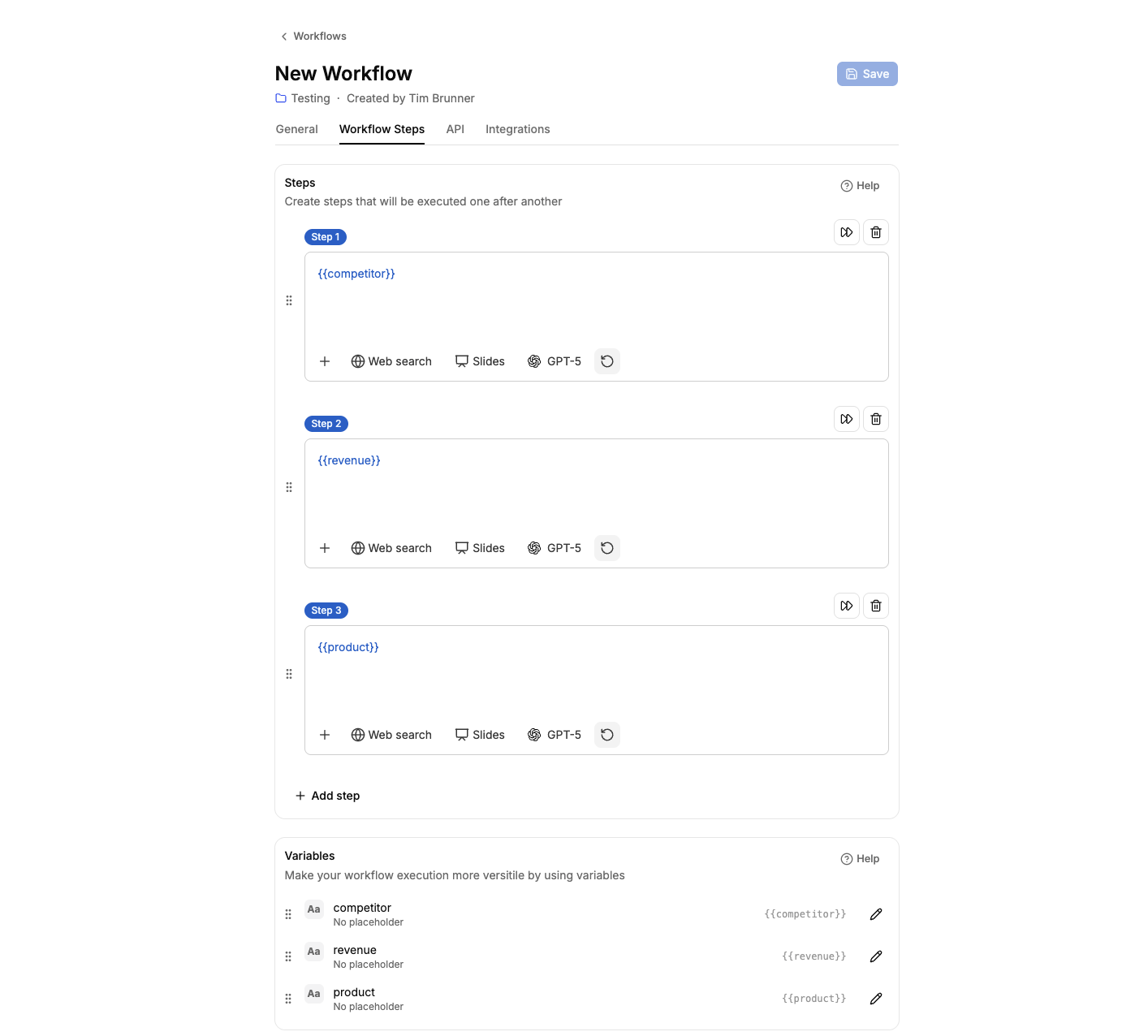
  6. Make effective use of variables: Use variables in meinGPT (e.g. {{Kundenanfrage}}) for dynamic automation. These can be populated directly with data from Bubble.io.

  7. Data Vault for company context: Use the meinGPT Data Vault to give your workflows company-specific context, such as product information, company policies or FAQs.

  8. Structured outputs: Configure your meinGPT Workflows to return structured data that can be easily processed further in Bubble.io.

  9. Incremental testing: Start with simple workflows and expand them step by step to manage complexity and minimise errors.

  10. Regular workflow review: Workflows should be reviewed and optimised regularly to ensure they continue to meet current requirements.

Common use cases for Bubble automation include streamlining data entry processes, automating customer notifications, and synchronising database updates across applications. In addition, users often use Bubble integrations to manage workflows that connect their Bubble apps with third-party services, boosting overall productivity.

Frequently asked questions about the Bubble.io–meinGPT integration

Question: What technical prerequisites do I need to integrate Bubble.io with meinGPT? Answer: You need accounts on both platforms, as well as on Make.com (for the simplest integration). No programming knowledge is required, but a basic understanding of APIs is helpful.

Question: Is the integration GDPR-compliant? Answer: Yes, meinGPT is fully GDPR-compliant with European hosting. Bubble.io also offers GDPR-compliant options. When configuring the integration via Make, you should make sure sensitive data is adequately protected.

Question: Can I integrate existing Bubble.io applications with meinGPT? Answer: Absolutely. Existing Bubble.io applications can easily be connected to meinGPT Workflows via API endpoints or Make.com, without requiring major changes to the application.

Question: What kinds of AI tasks can meinGPT handle within Bubble.io applications? Answer: The possibilities are wide-ranging: text generation, data analysis, classification, summarisation, sentiment analysis, translation, research and much more – depending on the AI model chosen.

Question: How scalable is the Bubble.io–meinGPT integration? Answer: Both platforms scale well. Bubble.io offers various performance tiers for growing applications, while meinGPT can be optimised for different workload requirements.

Question: What does integrating Bubble.io with meinGPT cost? Answer: The costs are made up of the subscriptions for both platforms. Bubble.io starts at around €29/month, and meinGPT offers various pricing models (meinGPT pricing). Additional costs apply for the integration via Make, starting at around €9/month.

Conclusion

Integrating Bubble.io with meinGPT Workflows opens up powerful opportunities for companies to build AI-powered applications without any programming effort. By combining Bubble.io's visual development platform with meinGPT's advanced, GDPR-compliant AI capabilities, companies can create innovative solutions that automate manual processes, process data intelligently, and improve customer experiences.

The success of this integration demonstrates the transformative impact of no-code development and illustrates how Bubble can democratise technology and drive innovation across various sectors. With meinGPT as an AI partner, this approach becomes even more powerful, more data-protection-compliant, and tailored specifically to the needs of European businesses.

Take the next step with meinGPT

Ready to build your own AI-powered applications with Bubble.io and meinGPT? Here are your next steps:

Get started today and harness the power of no-code development combined with advanced AI to revolutionise your business processes!

Sources

  1. Was kann No-Code? 5 beeindruckende Beispiele mit Bubble.io
  2. Bubble Tool Einführung: Der Low-Code und No-Code Leitfaden
  3. Bubble.io No Code Plattform – Was kann der Software Baukasten?
  4. Bubble: The full-stack no-code app builder. Start for free!
  5. Bubble.io: An Introduction to the No-Code Tool | 02100 Digital
  6. Bring your app idea to life: no coding required | Bubble
  7. Beste Alternativen für Bubble.io Webdesign
  8. 10 interessante Fakten über Bubble.io | 02100 Digital
  9. Learn Bubble.io, Launch No Code SaaS Startups
  10. Bubble: The no-code web app builder for innovative projects - Blinno Blog
  11. Creating API workflows | Bubble Docs
  12. The Workflow API | Bubble Docs
  13. How to trigger API workflows from external sources in Bubble.io? | RapidDev
  14. How to create an API Workflow in Bubble.io? | RapidDev
  15. API Connector | Bubble Docs
  16. How to connect to external APIs using the API Connector in Bubble.io? | RapidDev
  17. How to call external API in Backend Workflow - APIs - Bubble Forum
  18. How API Calls are structured in Bubble.io - Amlie Solutions
  19. The API Connector | Bubble Docs
  20. API | Bubble Docs
  21. Bubble Integrations | Connect Your Apps with Zapier
  22. Bubble + Zapier: Connect Everything Together With No-Code
  23. Bubble and Zapier Integration | Workflow Automation | Make
  24. Project Bubble Integrations | Connect Your Apps with Zapier
  25. Bubble Integration | Workflow Automation | Make
  26. Bubble IO app - Zapier/Make integration - Need help - Bubble Forum
  27. New integration: Build web apps using zero code with Bubble - Updates | Zapier
  28. About the Bubble Zapier Integration
  29. Bubble AI by Zapier Integration - Quick Connect - Zapier
  30. Creating An App On Zapier - APIs - Bubble Forum
  31. Showcase | Bubble
  32. Top 10 Bubble.io App Examples with Real-Life Use Cases
  33. Bubble App Examples: 7 Innovative Apps Built with Bubble.io
  34. Workflows | Bubble Docs
  35. Bubble integrations | Workflow automation with n8n
  36. 8 innovative examples of apps built with Bubble.io
  37. Bubble.io Review | Features, Benefits, Pricing & Alternatives
  38. No-Code App Examples: What You Can Build on Bubble | Bubble
  39. Bubble App Examples: Inspirational No-Code Startups Built with Bubble.io
  40. Bubble.io App Examples from Other Entrepreneurs